<?xml version="1.0" encoding="utf-8"?><feed xmlns="http://www.w3.org/2005/Atom" ><generator uri="https://jekyllrb.com/" version="3.10.0">Jekyll</generator><link href="https://photodemon.org/feed.xml" rel="self" type="application/atom+xml" /><link href="https://photodemon.org/" rel="alternate" type="text/html" /><updated>2025-12-12T18:16:26+00:00</updated><id>https://photodemon.org/feed.xml</id><title type="html">PhotoDemon: the fast, free, portable photo editor</title><subtitle>the fast, free, portable photo editor</subtitle><entry><title type="html">PhotoDemon 2025.12 is here</title><link href="https://photodemon.org/2025/12/12/photodemon-2025-12.html" rel="alternate" type="text/html" title="PhotoDemon 2025.12 is here" /><published>2025-12-12T08:00:00+00:00</published><updated>2025-12-12T08:00:00+00:00</updated><id>https://photodemon.org/2025/12/12/photodemon-2025-12</id><content type="html" xml:base="https://photodemon.org/2025/12/12/photodemon-2025-12.html"><![CDATA[<h2 id="overview">Overview</h2>

<p>Let’s squeeze one more PhotoDemon release into 2025, shall we?</p>

<p>PhotoDemon 2025.12 is now available.  I had hoped to have at least one major new feature ready before the end of the year, but I’m running out of time to make that happen… so I’ve decided to play it safe and postpone any major new features to early next year.</p>

<p>Instead, today’s 2025.12 release collects a number of file format improvements, important bug-fixes, localization updates, and a few minor new features.  (On the plus side, a lack of major overhauls means this release should be <em>extra</em> stable!)</p>

<p>Like all previous PhotoDemon releases, version 2025.12 runs on any Windows PC sold in the past 20 years.  All modern versions of Windows (XP through the latest Windows 11 insider builds) are fully supported, and this release even includes a few dedicated compatibility improvements for both Windows XP and Windows 7.</p>

<p>(Yes, PhotoDemon is still tested on those operating systems.)</p>

<h2 id="download-the-new-release">Download the new release</h2>

<p>If you already have a copy of PhotoDemon, you’re good to go!  PhotoDemon will automatically update according to your preference in the <code class="language-plaintext highlighter-rouge">Tools &gt; Options &gt; Updates</code> menu.</p>

<p>To manually download a fresh copy, <strong><a href="https://github.com/tannerhelland/PhotoDemon/releases/download/v2025.12/PhotoDemon-2025.12.zip">click here</a></strong> or <strong><a href="download/">visit the download page</a></strong>.</p>

<h2 id="special-thanks">Special thanks</h2>

<p>This release exists thanks to many wonderful volunteers who donated time, translations, money, and feedback to the project.</p>

<p>If you find PhotoDemon useful, <strong><a href="donate/">please consider making a small donation</a></strong>.  Your support makes this 100% free, 100% open-source project possible.</p>

<p><strong><a href="https://www.patreon.com/photodemon">Thank you especially to all of PhotoDemon’s Patreon supporters</a></strong>.  Thank you also to everyone who makes a <a href="donate/">one-time donation</a>.</p>

<p>Finally, thank you to everyone who contributed translations, bug reports, ideas, and feedback to this release.  I am grateful to all of you.  ❤</p>

<h2 id="whats-new-and-improved-in-this-release">What’s new and improved in this release</h2>

<p>Let’s assume you’re all as busy as I am this time of year, so instead of a huge essay with a billion photos, let’s revert to a simple, text-only list of noticeable improvements in this release.</p>

<p>(Thank you for allowing me to be lazier than usual this time around.)</p>

<h3 id="file-formats">File formats</h3>

<p>This release includes major updates for a few different file formats.</p>

<h4 id="overhauled-jpeg-2000-support">Overhauled JPEG-2000 support</h4>

<p>PhotoDemon now ships with <a href="https://www.openjpeg.org/">the OpenJPEG library</a> for greatly expanded and improved JPEG-2000 support.  JPEG-2000 images load up to <em>10x</em> faster than previous builds, broken JP2 images can now (often) be recovered, memory usage when importing/exporting JP2 images is way down, and a ton of JP2-related bugs and compatibility failures have finally been resolved.</p>

<p>After aggressively testing PhotoDemon’s JPEG-2000 implementation against the official <a href="https://github.com/uclouvain/openjpeg-data">OpenJPEG image conformance suite</a>, I feel confident stating that PD provides more comprehensive JPEG-2000 coverage than any other open-source photo editor.  Here are some of my developer notes from <a href="https://github.com/tannerhelland/PhotoDemon/commit/20f16fa57deda8b2c5c3b178b702dd78a704ba76">the main JP2 compatibility commit</a>:</p>

<ul>
  <li>Grayscale, RGB/A, and YUV/A color formats are all supported.</li>
  <li>Images tagged as “unknown” are now imported successfully in <em>most</em> cases (using heuristics to “guess” how to treat the image data).</li>
  <li>Per-channel subsampling is now supported.</li>
  <li>All color-depths (called “precisions” in JP2 parlance) are now supported.</li>
  <li>Signed color definitions are now supported.</li>
  <li>Many improvements have been made to import performance, and load time of large JPEG-2000 images is often reduced 90+% vs previous releases.</li>
  <li>Embedded ICC profiles (color management) are now supported.</li>
  <li>“Broken” or partially-broken JP2 images can often be largely recovered by the new import process.</li>
  <li>Unicode filenames and paths are now supported.</li>
  <li>Mislabeled JP2 files (bad file extensions) are now properly identified, and we’ll offer to fix.</li>
  <li>Images that exceed 32-bit memory limits can now be auto-downsized and imported into PD at a workable fraction of their original size.</li>
  <li>Weird edge-case behavior with nonstandard subsampling, color handling, and other quirky states has been overhauled to match OpenJPEG’s reference library behavior wherever possible.  This means PD now produces identical results in conformance suite handling to OpenJPEG’s reference handler.</li>
</ul>

<p>Thank you to everyone who submitted JPEG-2000-related bug reports in previous builds.  Your comments helped motivate this overhaul!</p>

<h4 id="new-dds-directdraw-surface-support">New DDS (DirectDraw Surface) support</h4>

<p><strong>The good news:</strong> PhotoDemon now uses the excellent <a href="https://github.com/microsoft/DirectXTex">DirectXTex library</a> for DDS import and export.  This brings huge compatibilty improvements, and PD should now successfully handle almost every variety of the (very complex) DDS format.  For the first time, PhotoDemon can also <em>export</em> DDS images.</p>

<p><strong>The bad news:</strong> like many modern tools, DirectXTex is only compatible with 64-bit operating systems.  PhotoDemon automatically handles interoperability for you, but full DDS support will only be activated on 64-bit systems.</p>

<h4 id="png-coverage-for-the-new-2025-specification-update">PNG coverage for the new 2025 specification update</h4>

<p>In 2025, the W3C <a href="https://www.w3.org/news/2025/portable-network-graphics-png-specification-third-edition-is-now-a-w3c-recommendation/">officially endorsed an updated PNG specification</a>.  This specification formalized some popular-but-unofficial-features (like animated PNGs, which PhotoDemon has supported for years).  But it also included a few new features, like <a href="https://github.com/w3c/ColorWeb-CG/blob/08d0981ae5163b76275d0777d0166eab85396371/hdr-in-png-requirements.md">color space chunks for modern HDR data</a>.</p>

<p>PhotoDemon’s PNG engine <a href="https://github.com/tannerhelland/PhotoDemon/commit/ef4f3fe27c43e525c036a3a0aee7268babc1b75d">now supports these new features</a>, making it one of the first open-source photo editors compatible with these updates.  This update also ensures that PNG images continue to look the same in PD as they do in your web browser.</p>

<h4 id="other-file-format-improvements">Other file format improvements</h4>

<p>Updates to relevant 3rd-party libraries bring improved coverage for WebP, HEIF/HEIC, and PDF files.  Coverage and bug-fixes for BMP-format images <a href="https://github.com/tannerhelland/PhotoDemon/commit/4ae73e9a1954cf635cb250e41d99ac4a1be0c071">has also improved</a>.</p>

<h3 id="front-end-improvements">Front-end improvements</h3>

<ul>
  <li>New <a href="https://github.com/tannerhelland/PhotoDemon/commit/4c915eaf774394f6454c71c854554ebe6df8bd83"><code class="language-plaintext highlighter-rouge">Image &gt; Show in file manager</code></a> menu</li>
  <li>New user preference to toggle automatic <a href="https://github.com/tannerhelland/PhotoDemon/commit/12d4665392936b99bebefac265a8bc80cec15ed2"><code class="language-plaintext highlighter-rouge">activate Move tool after paste</code></a></li>
  <li><a href="https://github.com/tannerhelland/PhotoDemon/commit/82497553e43474b7d8cb39d6abef9f3eba6bfdbc"><code class="language-plaintext highlighter-rouge">150% zoom</code> is now available</a> on the main viewport</li>
  <li>New option to <a href="https://github.com/tannerhelland/PhotoDemon/commit/dfbc963ee5478b101671149c7f2ad3c806995f8a"><code class="language-plaintext highlighter-rouge">reset all "remember my choice"</code></a> options</li>
  <li>New <a href="https://github.com/tannerhelland/PhotoDemon/commit/afa29e783d37f648f3952d5c75db40b7bf80b7af"><code class="language-plaintext highlighter-rouge">View &gt; Center image in viewport</code></a> menu</li>
  <li>New <a href="https://github.com/tannerhelland/PhotoDemon/commit/15d0ab8afd568ee74f50957770631fba07dddbe6">default hotkeys for rotate image left/right</a> (Ctrl+[ and Ctrl+], respectively)</li>
  <li>Improved tracking for <a href="https://github.com/tannerhelland/PhotoDemon/commit/391f1f5975f72292d79e4e578ba06171df01eaea">custom hotkey combinations</a></li>
  <li>Crop tool: <code class="language-plaintext highlighter-rouge">ENTER</code> and <code class="language-plaintext highlighter-rouge">ESC</code> hotkeys are now enabled for <a href="https://github.com/tannerhelland/PhotoDemon/commit/c95a594a4e1ec453288dd0aca831e2843d6815cb">committing or clearing the active crop</a></li>
  <li>The <a href="https://github.com/tannerhelland/PhotoDemon/commit/2fcbe32d8385fb391478e13a5bec6b147a9b0ccf">3rd-party libraries dialog has been hardened</a> to prevent click-happy users from accidentally disabling essential libraries.</li>
</ul>

<h3 id="back-end-improvements">Back-end improvements</h3>

<ul>
  <li>Critical bug-fixes for users in <a href="https://github.com/tannerhelland/PhotoDemon/commit/1d54ddda88efea4cb034a719a96473e5f5dba0d4">Taiwanese and other <code class="language-plaintext highlighter-rouge">Traditional Chinese</code> language locales</a>.  A huge shout-out and thank-you to <a href="https://github.com/love80312">笙歌</a> for their help with this!</li>
  <li>Ongoing improvements to XP and Windows 7 compatibility, particularly regarding <a href="https://github.com/tannerhelland/PhotoDemon/commit/2a89bab62b445d4ab6f5aad206be6b74fbf152c2">3rd-party library behavior</a>.</li>
  <li>A number of bug-fixes for <a href="https://github.com/tannerhelland/PhotoDemon/commit/2f4838472f537d41ece02c544357a088f60f4497">high-DPI displays</a></li>
  <li>Improved <a href="https://github.com/tannerhelland/PhotoDemon/commit/b01e52ee15466f0c6c1028b573ed33ca37b2051f">program shutdown performance</a></li>
  <li>Corrupt preferences files can now (usually) be <a href="https://github.com/tannerhelland/PhotoDemon/commit/b2d89b9a91aacbae458deb198df787b4bf6271a5">detected and silently reset</a>, preventing crashes on subsequent sessions if you yank out PhotoDemon’s USB drive without safely ejecting it.</li>
  <li>Fixes for <a href="https://github.com/tannerhelland/PhotoDemon/commit/0ce428153de701865f265301c98c34551b1a55be">Unicode captions not displaying</a> correctly in some esoteric dialogs</li>
  <li>Fixes for the main window’s caption <a href="https://github.com/tannerhelland/PhotoDemon/commit/9b112d7ff241b8ad3af4e8946170baffe4e07130">not diplaying changed file formats correctly</a> after a <code class="language-plaintext highlighter-rouge">File &gt; Save As</code> operation.</li>
</ul>

<h3 id="many-updates-to-localization-files-and-features">Many updates to localization files and features</h3>

<p>Like every new PhotoDemon release, language files have seen numerous updates and improvements thanks to many generous volunteers.  A huge thank-you to everyone who contributes to PhotoDemon’s extensive localization support.</p>

<p>Notably, this is also the first PhotoDemon release to ship with support for the following languages:</p>

<p><a href="https://github.com/tannerhelland/PhotoDemon/commit/3855401363138bdfcb192a2f5ae29e703c27c623">Turkish, by Berat Tezer</a>.<br />
<a href="https://github.com/tannerhelland/PhotoDemon/commit/3622ff627c5f9690761231d099e694ee38eab17e">Hungarian, by Bánszki István</a>.<br />
<a href="https://github.com/tannerhelland/PhotoDemon/commit/1f9f7dc67f3bc96ea7a0852187ce5d3fa774f1e4">Romanian, by L. Ivanov</a>.<br /></p>

<p>Thank you these authors for their contributions, and an extra big thank-you to everyone who continues to offer their localization services with each new PhotoDemon release.</p>

<h3 id="other">Other</h3>

<p>For an exhaustive list of changes and bug-fixes, <a href="https://github.com/tannerhelland/PhotoDemon/commits/main">review the project’s commit log</a>.</p>

<h2 id="in-conclusion">In conclusion</h2>

<p>Thank you for using PhotoDemon.</p>

<p>I am grateful to everyone who contributes to each release, whether through donations, Patreon, GitHub, or by sending old-fashioned emails.  A full list of contributors is available on <a href="contributors/">the Contributors page</a>, or in the <code class="language-plaintext highlighter-rouge">Help &gt; About</code> menu of PhotoDemon itself.  PhotoDemon’s ever-expanding community is full of amazing individuals, and they are the reason I can give this program away for free.</p>

<p>If you find PhotoDemon useful, <strong><a href="donate/">please consider making a one-time donation</a></strong> or <strong><a href="https://www.patreon.com/photodemon">making small monthly donations on Patreon</a></strong>.  I’d love to add you to the next contributor list.</p>

<p>I hope you enjoy this release, and I hope to see you next year with an even bigger one.</p>]]></content><author><name>Tanner Helland</name><email>tannerhelland@gmail.com</email></author><summary type="html"><![CDATA[PhotoDemon 2025.12 is now available. This release brings improved file format support (DDS, JPEG-2000, and PNG in particular), new viewport options, improved compatibility with Windows XP and 7, and numerous optimizations and bug-fixes.]]></summary></entry><entry><title type="html">PhotoDemon 2025.4 is here</title><link href="https://photodemon.org/2025/04/24/photodemon-2025-4.html" rel="alternate" type="text/html" title="PhotoDemon 2025.4 is here" /><published>2025-04-24T08:00:00+00:00</published><updated>2025-04-24T08:00:00+00:00</updated><id>https://photodemon.org/2025/04/24/photodemon-2025-4</id><content type="html" xml:base="https://photodemon.org/2025/04/24/photodemon-2025-4.html"><![CDATA[<p><img src="media/images/photodemon-2024-5-with-text.png" alt="screen-capture" /></p>

<h2 id="overview">Overview</h2>

<p>PhotoDemon 2025.4 is here!  Highlights of this release include a new on-canvas crop tool, size and location persistence for effect and adjustment dialogs, support for custom font folders, bad file extension repair, reduced memory usage, import/export support for legacy PCX images, and much more.</p>

<p>Like all previous PhotoDemon releases, version 2025.4 runs on any Windows PC sold in the past 20 years.  All modern versions of Windows (XP through the latest Windows 11 insider builds) are fully supported.</p>

<h2 id="download-the-new-release">Download the new release</h2>

<p>If you already have a copy of PhotoDemon, you’re good to go!  PhotoDemon will automatically update according to your preference in the <code class="language-plaintext highlighter-rouge">Tools &gt; Options &gt; Updates</code> menu.</p>

<p>To manually download a fresh copy, <strong><a href="https://github.com/tannerhelland/PhotoDemon/releases/download/v2025.4/PhotoDemon-2025.4.zip">click here</a></strong> or <strong><a href="download/">visit the download page</a></strong>.</p>

<h2 id="special-thanks">Special thanks</h2>

<p>This release exists thanks to many wonderful volunteers who donated time, translations, money, and feedback to the project.</p>

<p>If you find PhotoDemon useful, <strong><a href="donate/">please consider making a small donation</a></strong>.  Your support makes this 100% free, 100% open-source project possible.</p>

<p><strong><a href="https://www.patreon.com/photodemon">Thank you especially to all of PhotoDemon’s Patreon supporters</a></strong>.  Thank you also to everyone who makes a <a href="donate/">one-time donation</a>.</p>

<p>Finally, thank you to everyone who contributed translations, bug reports, ideas, and feedback to this release.  I am grateful to all of you.  ❤</p>

<h2 id="whats-new-and-improved-in-this-release">What’s new and improved in this release</h2>

<h3 id="on-canvas-crop-tool">On-canvas crop tool</h3>

<p>PhotoDemon has always supported cropping images via its (many!) selection tools.  But new to this release is a dedicated on-canvas crop tool, available from the <em>layout</em> section of the toolbox:</p>

<p><img src="media/images/photodemon-crop-tool.png" alt="screen-capture" /></p>

<p>Like other on-canvas tools, a lot of work went into making this new crop tool both convenient and precise.  You can click-drag to create (and edit) a crop rectangle, and you can set precise position and measurement values with the text boxes in the top toolbar.</p>

<p><img src="media/images/crop-tool-edit.webp" alt="screen-capture" /></p>

<p>The user interface highlights different edit points in real-time, and you can modify the “highlight” or “shield” effect (as Photoshop calls it) to your liking.  Here’s what a 50% “white” highlight looks like, for example:</p>

<p><img src="media/images/crop-tool-highlight-settings.png" alt="screen-capture" /></p>

<p>As you’ve noticed in the above screenshots, you can also overlay different guides on the crop region.  This can help you achieve that perfect <a href="https://en.wikipedia.org/wiki/Rule_of_thirds">rule of thirds composition</a>, for example:</p>

<p><img src="media/images/crop-tool-guides.png" alt="screen-capture" /></p>

<p>If you need to crop to a fixed size or aspect ratio, worry not - preset lists are available for both:</p>

<p><img src="media/images/crop-tool-presets.png" alt="screen-capture" /></p>

<p>These lists are generated from simple text files saved in the <code class="language-plaintext highlighter-rouge">Data/Presets/Template_Sizes.txt</code> and <code class="language-plaintext highlighter-rouge">Data/Presets/Template_Aspects.txt</code> files.  You can freely modify those files to your liking, removing or adding whatever presets you like!  (Note that you can add presets in pixel or “real-world” measurements - both are supported.)</p>

<p>Finally, there are a number of additional options for the crop process itself.  You can choose to crop the entire image or just the active layer.  Activate the <code class="language-plaintext highlighter-rouge">allow enlarging</code> toggle to let the crop rectangle float outside the image, so you can crop to a new, <strong>larger</strong> size.</p>

<p>When cropping the full image, you can also toggle <code class="language-plaintext highlighter-rouge">delete cropped pixels</code>.  When this is turned <em>off</em>, image boundaries are adjusted to achieve the crop, but no actual pixels are removed.  (This is also called <strong>non-destructive cropping</strong>.)</p>

<p>The new crop tool incorporates many ideas from other popular photo editors, and I hope it helps you crop images more easily than ever.</p>

<h3 id="size-and-location-persistence-for-effect-and-adjustment-dialogs">Size and location persistence for effect and adjustment dialogs</h3>

<p>This new feature is simple: when you interact with any <code class="language-plaintext highlighter-rouge">Adjustment</code>, <code class="language-plaintext highlighter-rouge">Effect</code>, or <code class="language-plaintext highlighter-rouge">File &gt; Save</code> window, PhotoDemon now remembers any size and position changes you make to that window.  Those changes are automatically restored the next time you use that tool.</p>

<p>If you like your effect windows huge and weirdly positioned, this feature’s for you!</p>

<h3 id="improved-and-expanded-user-preferences">Improved and expanded user preferences</h3>

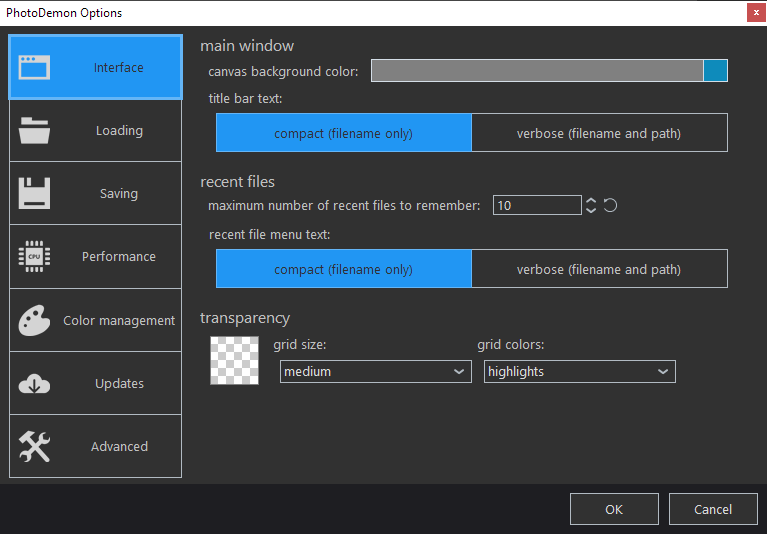
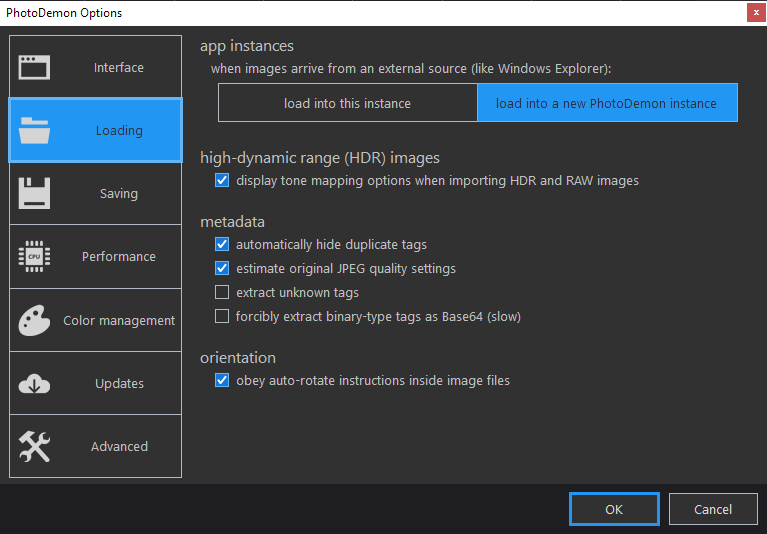
<p>In recent years, PhotoDemon’s <code class="language-plaintext highlighter-rouge">Tools &gt; Options</code> dialog has become a little too cluttered for my liking.  On old PCs, preferences might take several seconds to load, and individual panels had become overwhelmed with toggles.</p>

<p>So in this release, I redesigned the <code class="language-plaintext highlighter-rouge">Tools &gt; Options</code> dialog and rewrote the backend that manages it.  Individual panels are now loaded on-demand, which makes the dialog’s startup time basically instantaneous, even on very old PCs.</p>

<p>While I was here, I took the time to organize the various panels into more modern and manageable categories:</p>

<p><img src="media/images/photodemon-tools-options.png" alt="screen-capture" /></p>

<p>The new organization allows individual pages to “breathe” a little better, and it’s also given me room to add some long-requested options from users.</p>

<p>Some of the new user options in this release include:</p>

<h4 id="custom-fonts">Custom fonts</h4>

<p>Some users like to keep their system font list clean, so rather than add new fonts to Windows itself (which in turn adds them to <em>all</em> software on your PC), they instead manage custom fonts manually, adding them only to software that actually uses it.</p>

<p><img src="media/images/tools-options-fonts.png" alt="screen-capture" /></p>

<p>In this release, you can now tell PhotoDemon about those secret font folders with the <code class="language-plaintext highlighter-rouge">Tools &gt; Options &gt; Fonts</code> panel.  Any folders added here (and their sub-folders!) will be automatically scanned for font files.  Even very large font collections shouldn’t impact app startup performance, but I’d love more feedback on this from users with insane font lists!</p>

<p>Part of the way this performance is achieved is by forcing an app restart after font collection changes.  I apologize for this inconvenience, but it was a necessary evil for handling large font collections in a speedy way.</p>

<p>Since I now have a place to stick weird font options, I thought I’d expose a silly option that has existed for awhile but was previously kept hidden - the ability to change PhotoDemon’s interface font.  If you really want it, you can now get the Comic Sans interface of your dreams:</p>

<p><img src="media/images/oh-no-comic-sans.png" alt="screen-capture" /></p>

<p>This won’t work with <em>all</em> fonts due to inherent font spacing issues, but for accessibility reasons, I’m glad users now have a way to manipulate it.</p>

<h4 id="custom-menu-mnemonics-handling">Custom menu mnemonics handling</h4>

<p>Menu mnemonics are the letters you can type (while holding down the <code class="language-plaintext highlighter-rouge">Alt</code> key) to access individual menus, like <code class="language-plaintext highlighter-rouge">Alt+F</code> for <code class="language-plaintext highlighter-rouge">File</code>.  PhotoDemon generates these mnemonics automatically at run-time for your current language.</p>

<p>Before, English equivalent mnemonics were automatically shown for languages without 1:1 keyboard-letter mapping.  Now, however, you can manually turn on or off the display of mnemonics for <em>any</em> language:</p>

<p><img src="media/images/japanese-mnemonics.png" alt="screen-capture" /></p>

<h4 id="splash-screen">Splash screen</h4>

<p>If you don’t like PhotoDemon’s minimalist splash screen (the logo that pops up while the app initializes), you can now turn it off.  This doesn’t affect program startup time, but it provides a “cleaner” appearence for those who frequently start/stop the app.</p>

<h4 id="mousewheel-behavior">Mousewheel behavior</h4>

<p>By default, PhotoDemon uses the mousewheel for scrolling, and Ctrl+Mousewheel for zooming.</p>

<p>You can now swap this behavior from the <code class="language-plaintext highlighter-rouge">Tools &gt; Options &gt; Input devices</code> panel.</p>

<h4 id="disable-import-time-color-management-entirely">Disable import-time color management entirely</h4>

<p>PhotoDemon has long supported embedded color profiles to improve (or rather, “make accurate”) the display of various image formats.  But in a classic case of “no good deed goes unpunished”, there are a <em>lot</em> of images out there with malformed color data.  Images with bad profiles can do more harm than good, so I’ve now added a toggle for disabling import-time color management entirely.</p>

<p>(There are actually two toggles for this - one for disabling standard ICC color profiles, and another for disabling format-specific color profile data, like the sRGB, gamma, and/or chromaticity chunks available to PNG files.)</p>

<h4 id="in-conclusion-new-program-options">In conclusion (new program options)…</h4>

<p>So those are a few of the <code class="language-plaintext highlighter-rouge">Tools &gt; Options</code> updates in this release.  If you want yet <em>other</em> ways to customize PhotoDemon, <a href="https://photodemon.org/about/#contact">let me know</a> and I’ll see what I can do!</p>

<h3 id="reduced-memory-usage">Reduced memory usage</h3>

<p>As part of PhotoDemon’s ongoing goal to be the smallest, lightest photo editor money (can’t) buy, this release includes an exciting new memory management feature.</p>

<p>When working with multiple images, PhotoDemon can now automatically suspend “inactive” images to disk.  This effectively allows you to work with an unlimited* number of images at once.</p>

<p><em>(*In this context, “unlimited” technically means “limited only by available hard drive space.”)</em></p>

<p>Let’s say that you have a giant image open - “Large Image 1” - and you then load another giant image - “Large Image 2”.  While “Large Image 2” loads, if PhotoDemon detects that available RAM is becoming problematic, it will silently migrate all (or some) of “Large Image 1” pixel data out to the hard drive, compressing the data as it does so using the high-speed <a href="https://github.com/lz4/lz4">lz4 compressor</a>.</p>

<p>If/when you switch from “Large Image 2” back to “Large Image 1”, any suspended pixel data is silently retrieved.  And, if necessary, portions of “Large Image 2” may then be migrated out to disk to ensure seamless behavior if available RAM remains low.</p>

<p>PhotoDemon also activates this new memory manager when RAM runs low under other circumstances, like effects or adjustments that require multiple copies of the active layer.  You don’t have to do anything - it all happens behind-the-scenes.</p>

<p>If you have a modern PC with tons of RAM, this feature may never kick in.  But if, like me, you still use ancient PCs for some tasks, this feature will allow you to work with larger images, and larger image <em>collections</em>, than ever before.</p>

<h3 id="bad-file-extension-repair">Bad file extension repair</h3>

<p>Images downloaded from the Internet are frequently labeled incorrectly.  For example, an image named “Image.JPG” may actually be in PNG format.  In previous releases, wrong file extensions could sometimes trip up PhotoDemon, especially if it assigned a mislabeled image to the wrong third-party library.</p>

<p>This behavior has been fixed in the current release and PhotoDemon will now <em>always</em> double-check file contents before assuming a given image format.  But why not take this a step further and <strong>fix</strong> incorrectly labeled images so that they don’t break <em>other</em> software!</p>

<p>In PhotoDemon 2025.4, if you load a mislabeled image, a message like this now appears:</p>

<p><img src="media/images/bad-file-extension.png" alt="screen-capture" /></p>

<p>Click “Yes” to fix the faulty file once and for all, or “No” to leave the file as the mislabeled monster it is.</p>

<h3 id="improved-single-pixel-painting-for-pencil-brush-and-eraser-tools">Improved single-pixel painting for pencil, brush, and eraser tools</h3>

<p>PhotoDemon supports <a href="https://en.wikipedia.org/wiki/Subpixel_rendering">sub-pixel positioning</a> for its paint tools.  When zoomed-in, this allows you to place paint strokes anywhere “inside” a given pixel, and PD automatically figures out the antialiasing required to make that positioning work.</p>

<p>But sometimes - like when doing pixel art - you don’t want this behavior, which is why PhotoDemon now provides an “align to pixel grid” toggle for the pencil, paintbrush, and eraser tools.</p>

<p>Here’s an animation of the old behavior (still available when “align to pixel grid” is turned <strong>off</strong>:</p>

<p><img src="media/images/paint-align-grid-off.png" alt="screen-capture" /></p>

<p>Here’s an animation of the new behavior (available when “align to pixel grid” is turned <strong>on</strong>:</p>

<p><img src="media/images/paint-align-grid-on.png" alt="screen-capture" /></p>

<p>This new toggle provides absolute precision when working at a single-pixel level, but you can turn it off whenever you want smooth, natural-looking brush strokes.</p>

<h3 id="importexport-support-for-legacy-pcx-images">Import/export support for legacy PCX images</h3>

<p>With every new release, I try to do at least one deep dive into an image format I haven’t studied before.  This time, it was the venerable <a href="https://en.wikipedia.org/wiki/PCX">PCX image file format</a>.</p>

<p>PhotoDemon previously used a third-party library for PCX support, but in this release, it now has its own PCX decoder and encoder.  The new encoder+decoder pair is significantly faster, covers many more PCX variants (including the multi-page DCX extension), and can even fix some PCX images that were incorrectly encoded by other software.</p>

<p>While PCX is rarely used for new images (modern formats like PNG are far superior), Photoshop still supports PCX for both loading and saving, so I’m happy to report that PhotoDemon now covers it well too.</p>

<h3 id="magnetic-angle-snapping-when-rotating-layers">Magnetic “angle snapping” when rotating layers</h3>

<p>Last year, the 2024.7 release added support for “magnetic snapping” when positioning layers.  In this release, snapping support expands to include layer <em>rotation</em> too.</p>

<p>Hold down the <code class="language-plaintext highlighter-rouge">Shift</code> key to snap a layer to 15° increments, or toggle the new 90°, 45°, and 30° angle options in the <code class="language-plaintext highlighter-rouge">View &gt; Snap to</code> menu to always snap when rotating.  (There is also a new “angle snap distance” preference in the <code class="language-plaintext highlighter-rouge">Tools &gt; Options &gt; Input devices</code> panel.)</p>

<h3 id="many-updates-to-localization-files-and-features">Many updates to localization files and features</h3>

<p>Like every new PhotoDemon release, language files have seen numerous updates and improvements thanks to many generous volunteers.  Thank you so much to everyone who contributes to PhotoDemon’s extensive localization support!</p>

<p>Notably, this is also the first PhotoDemon release to ship with support for the following languages:</p>

<p><a href="https://github.com/tannerhelland/PhotoDemon/commit/25f917d76fc1e91ea2a9d6f8622f855fd18f23fd">Czech, by LsGeorge</a>.<br />
<a href="https://github.com/tannerhelland/PhotoDemon/commit/10103eec88c613183bf42923f6c888548ea60d1d">Ukranian, by bulbaka</a>.</p>

<p>Thank you these authors for their contributions, and an extra big thank-you to everyone who continues to offer their localization services with each new PhotoDemon release.</p>

<h2 id="additional-upgrades-and-improvements">Additional upgrades and improvements.</h2>

<p>Those are some of the biggest improvements available in PhotoDemon 2025.4, but alongside the usual bug-fixes and performance enhancements, a few other new features snuck in.</p>

<p>Other highlights of this release include:</p>

<ul>
  <li>All <code class="language-plaintext highlighter-rouge">File &gt; Export</code> dialogs are now <a href="https://github.com/tannerhelland/PhotoDemon/commit/24a11abec30bf4a12ea212ca7620f05a94d38721">freely resizable at run-time</a>.</li>
  <li>Improved and expanded <a href="https://github.com/tannerhelland/PhotoDemon/commit/53af99703975d51fdb89052424fcca64dd06ebfa"><code class="language-plaintext highlighter-rouge">Adjustments &gt; Color &gt; Colorize</code> tool</a>.</li>
  <li>Improved <a href="https://github.com/tannerhelland/PhotoDemon/commit/7b050c43a9a3225fdc2a0a3dd1c02bbfecce78dc"><code class="language-plaintext highlighter-rouge">Adjustments &gt; Histogram &gt; Display histogram</code> tool</a>.</li>
  <li>Improved startup performance thanks to <a href="https://github.com/tannerhelland/PhotoDemon/commit/c15d9407ff0a27129ca3c550d74887ff512125e0">on-demand loading of some non-essential plugins</a>.</li>
  <li>Improved quality of <a href="https://github.com/tannerhelland/PhotoDemon/commit/ccf1e08d5b4adbca3f714d48106cbc4a3c4b9fed">automatically exported icon frames</a>.</li>
  <li>Reduced memory usage of <a href="https://github.com/tannerhelland/PhotoDemon/commit/a66339bd8d256bddee032356bb87e142369685cf">animation effect and viewer dialogs</a>.</li>
  <li>The titlebar now displays <a href="https://github.com/tannerhelland/PhotoDemon/commit/6c943787d47f97f490234617375946321e8946d9">the canonical file format of an image</a>, instead of just its file extension.</li>
  <li>Improved <a href="https://github.com/tannerhelland/PhotoDemon/commit/e65d318d185194eb670bca03ce5ca5f794d99d9a">AVIF image support</a>.</li>
  <li>Improved <a href="https://github.com/tannerhelland/PhotoDemon/commit/8ccde59df461a7e4565420538b725f1b80254cd8">JPEG-XL coverage</a>, thanks to third-party <a href="https://github.com/libjxl/libjxl">libjxl library</a> updates.</li>
  <li>Improved <a href="https://github.com/tannerhelland/PhotoDemon/commit/888d42b19eeb0ec77e22d5676717d704ee981bdc">PaintShop Pro (PSP) format coverage</a>.</li>
  <li>Improved <a href="https://github.com/tannerhelland/PhotoDemon/commit/59722aafd31f7aee380cd6c0d867f53728dcabe6">WebP coverage</a>, thanks to third-party <a href="https://chromium.googlesource.com/webm/libwebp">libwebp library</a> updates.</li>
  <li>Improved <a href="https://github.com/tannerhelland/PhotoDemon/commit/4d15e287259b909318534194035c5c70b15428e5">PDF coverage</a>, thanks to third-party <a href="https://github.com/chromium/pdfium">pdfium library</a> updates.</li>
  <li>Improved <a href="https://github.com/tannerhelland/PhotoDemon/commit/9282e7631e25bdb6e13ac52065ec35d597b40ad9">SVG coverage</a> thanks to third-party <a href="https://github.com/linebender/resvg">resvg library</a> updates.</li>
  <li><a href="https://github.com/tannerhelland/PhotoDemon/commit/39185953c290ce7901eef087d733b60efb6a5d88">UI improvements on high-DPI displays</a>.</li>
</ul>

<h3 id="other">Other</h3>

<p>For an exhaustive list of changes and bug-fixes, <a href="https://github.com/tannerhelland/PhotoDemon/commits/main">review the project’s commit log</a>.</p>

<h2 id="in-conclusion">In conclusion</h2>

<p>Thank you for using PhotoDemon.</p>

<p>I am grateful to everyone who contributes to each release, whether through donations, Patreon, GitHub, or by sending old-fashioned emails.  A full list of contributors is available on <a href="contributors/">the Contributors page</a>, or in the <code class="language-plaintext highlighter-rouge">Help &gt; About</code> menu of PhotoDemon itself.  PhotoDemon’s ever-expanding community is full of amazing individuals, and they are the reason I can give this program away for free.</p>

<p>If you find PhotoDemon useful, <strong><a href="donate/">please consider making a small one-time donation</a></strong> or <strong><a href="https://www.patreon.com/photodemon">joining our Patreon family</a></strong>.  I’d love to add you to the next contributor list.</p>

<p>I hope you enjoy this release, and I hope to see you later this year with the next one.</p>]]></content><author><name>Tanner Helland</name><email>tannerhelland@gmail.com</email></author><summary type="html"><![CDATA[PhotoDemon 2025.4 is now available. This release brings a new on-canvas crop tool, size and location persistence for effect and adjustment dialogs, support for custom font folders, bad file extension repair, reduced memory usage, import/export support for legacy PCX images, and much more.]]></summary></entry><entry><title type="html">PhotoDemon 2024.12 is here</title><link href="https://photodemon.org/2024/12/05/photodemon-2024-12.html" rel="alternate" type="text/html" title="PhotoDemon 2024.12 is here" /><published>2024-12-05T08:00:00+00:00</published><updated>2024-12-05T08:00:00+00:00</updated><id>https://photodemon.org/2024/12/05/photodemon-2024-12</id><content type="html" xml:base="https://photodemon.org/2024/12/05/photodemon-2024-12.html"><![CDATA[<p><img src="media/images/PhotoDemon-2024-12-edit-hotkeys.png" alt="screen-capture" /></p>

<h2 id="overview">Overview</h2>

<p>Two releases in one calendar year?!  It’s a holiday miracle!</p>

<p>Yes, PhotoDemon 2024.12 is now available to download. Highlights of this release include HEIF/HEIC image support and customizable keyboard shortcuts (hotkeys).</p>

<p>Like all previous PhotoDemon releases, version 2024.12 runs on any Windows PC sold in the past 20 years.  All modern versions of Windows (XP through the latest Windows 11 insider builds) are fully supported.</p>

<h2 id="download-the-new-release">Download the new release</h2>

<p>If you already have a copy of PhotoDemon, you’re good to go!  PhotoDemon will automatically update according to the preference in your <code class="language-plaintext highlighter-rouge">Tools &gt; Options &gt; Updates</code> menu.</p>

<p>If you want to manually download a fresh copy, <strong><a href="https://github.com/tannerhelland/PhotoDemon/releases/download/v2024.12/PhotoDemon-2024.12.zip">click here</a></strong> or <strong><a href="download/">visit the download page</a></strong>.</p>

<h2 id="special-thanks">Special thanks</h2>

<p>This release exists thanks to many wonderful contributors who donated time, money, and feedback to the project.</p>

<p>If you find PhotoDemon useful, <strong><a href="donate/">please consider making a small donation</a></strong>.  Your support makes this 100% free, 100% open-source project possible.</p>

<p><strong><a href="https://www.patreon.com/photodemon">Thank you especially to all of PhotoDemon’s Patreon supporters</a></strong>.  Thank you also to everyone who makes a <a href="donate/">one-time donation</a>.</p>

<p>Finally, thank you to everyone who contributed translations, bug reports, ideas, and feedback to this release.  I am grateful to all of you.  ❤</p>

<h2 id="whats-new-and-improved-in-this-release">What’s new and improved in this release</h2>

<h3 id="customizable-hotkeys">Customizable hotkeys</h3>

<p>I’ll be honest - I don’t modify keyboard shortcuts in any of my daily software.</p>

<p>So I’ve been consistently surprised to receive so many requests for customizable hotkeys in PhotoDemon.  Apparently many of you create your own hotkey collections across all the software you use?  I’m impressed!  (And horrified!)</p>

<p>I have long dreaded adding this feature to PhotoDemon.  PhotoDemon has hundreds of different tools, adjustments, and effects - and custom hotkeys need to integrate cleanly with <em>every single one of them</em>.  Also, any time you let users customize core app features, it opens a <a href="https://en.wikipedia.org/wiki/Pandora%27s_box">Pandora’s Box</a> of new ways to break things.</p>

<p>Despite these fears, I finally relented and tackled this feature.  After several months of dedicated work, you can finally edit PhotoDemon’s hotkeys to your liking.</p>

<p>Start by clicking the new <code class="language-plaintext highlighter-rouge">Tools &gt; Keyboard shortcuts</code> menu:</p>

<p><img src="media/images/keyboard-shortcuts-menu.png" alt="screen-capture" /></p>

<p>This brings up a dialog that displays all of PhotoDemon’s (many) features:</p>

<p><img src="media/images/keyboard-shortcuts-default.png" alt="screen-capture" /></p>

<p>The main box at the top is a treeview control.  You can expand individual items (nodes) to see additional hotkey targets.  Everything is organized identically to PhotoDemon’s main menu system.</p>

<p>Items in <strong>bold</strong> can be assigned hotkeys.  Items that are <strong>not bold</strong> are just organizational - typically, these are parent categories that simply collect a bunch of related features together.</p>

<p>Scroll down to the very bottom of the tree to edit hotkeys for non-menu features, like toolbox tools:</p>

<p><img src="media/images/keyboard-shortcuts-toolbox.png" alt="screen-capture" /></p>

<p>Click on an item and it will open up a text box.  Type any valid key combination and PhotoDemon will automatically catch it and assign that combination as your new hotkey.</p>

<p>Hopefully this works for you, but one of the most frustrating things I encountered when working on this feature was that auto-detecting certain hotkey combinations simply doesn’t work.  On my development PC, I eventually tracked down the culprit: <strong>other software</strong>, which can “steal” various hotkeys before they reach PhotoDemon.  (AMD and Nvidia’s system apps were particularly aggressive about this.)  A search online showed that <em>many</em> apps do this, including a huge list of apps that come installed on various PC brands - apps that most users rarely, if ever, directly interact with.</p>

<p>To provide a workaround for this problem, I’ve also added the ability to manually choose hotkeys by selecting them from a dropdown list:</p>

<p><img src="media/images/keyboard-shortcuts-list-of-keys.png" alt="screen-capture" /></p>

<p>The list of available keys is generated by your system, and all key names are pulled from your system keyboard driver.  Because there is endless variety in keyboard layouts, this should enable you to use any physical keys provided by your keyboard, as long as the keyboard manufacturer supplies a valid name to the Windows system libraries that handle key events.  (PhotoDemon relies on those Windows libraries for generating all keys and keys names).</p>

<p>Once a hotkey is associated with PhotoDemon, it <em>should</em> take precedence in handling the hotkey over other software on your PC (while PhotoDemon is running and actively has focus, at least).  If for some reason you cannot get a specific hotkey combination to work, you will need to figure out which software is stealing that hotkey and turn it off.  (Or, just use a different key combo for PhotoDemon - this was often the easier choice for me!)</p>

<p>Your saved hotkey collection can be saved to or loaded from a standalone file.  You can also use the “generate summary” button to produce a webpage (HTML) of your full hotkey collection, including any changes you’ve made:</p>

<p><img src="media/images/keyboard-shortcuts-html.png" alt="screen-capture" /></p>

<p>A cute aspect of this feature is that your current PhotoDemon interface color is used as the HTML accent color.  Fun!</p>

<p>This finally solves the long-standing question of “where can I find all of PhotoDemon’s hotkeys?”  I’m sorry it took me this long to document it!</p>

<p>If you decide you don’t like any of the hotkey changes you’ve made, you can always reset everything to its default state, or just undo changes you’ve made this session via the on-screen buttons.</p>

<p>Finally, let me mention one more feature of this tool.  (This is where I attempt to address the afore-mentioned <em>“Pandora’s box of ways to break things”</em>!)</p>

<p>If you attempt to assign the same hotkey to multiple features, PhotoDemon will detect it and warn you.  Hover the problematic command and a tooltip will pop up, describing which commands conflict:</p>

<p><img src="media/images/keyboard-shortcuts-duplicate-warning.png" alt="screen-capture" /></p>

<p>This should make it easy to resolve any duplicate hotkeys that may occur.</p>

<h3 id="save-and-load-heicheif-images">Save and load HEIC/HEIF images</h3>

<p>The “High Efficiency Image Format”, or “HEIF”, has been the default image format on Apple devices since 2017.  Android devices added support in 2019, and since then, <a href="https://en.wikipedia.org/wiki/High_Efficiency_Image_File_Format#Hardware">many digital camera manufacturers have also added HEIF support</a>.</p>

<p>PhotoDemon added support for HEIF/HEIC some years back, but this relied on Microsoft Windows’s official HEIF library.  Microsoft - a company worth more than <em>$3 trillion USD</em> as of this writing - didn’t want to participate in the HEIF patent consortium, so rather than add HEIF support to Windows, they actually require <em>you</em> to go to the Microsoft Store and manually buy a $0.99 USD HEIF add-on.  (This presumably covers any patent licensing fees, plus a little extra for some executive’s sixth or seventh yacht.)</p>

<p>Needless to say, very few users do this.</p>

<p>So in this release, I finally bit the bullet and natively integrated HEIF/HEIC support directly into PhotoDemon, c/o <a href="https://github.com/strukturag/libheif">the open-source libheif library</a>.  Many thank-yous to the libheif authors for their great work.</p>

<p>With this, HEIF/HEIC images can now be loaded <em>and</em> saved with PhotoDemon, even if you don’t buy the “official” Microsoft add-on.  PD is also unique in offering support for <a href="https://github.com/tannerhelland/PhotoDemon/commit/4869659943e34a02b14a76c644bff9d349ef5146">multi-frame HEIF/HEIC images</a>.  This works automatically when importing HEIF images, and when exporting HEIFs, a multi-frame toggle appears when the source image contains multiple layers:</p>

<p><img src="media/images/export-heif.png" alt="screen-capture" /></p>

<p>(Note that multi-frame support is primarily intended for frames with identical sizes, so be careful using this for other types of layered images - HEIF is <strong>not</strong> a replacement for traditional layered image formats!)</p>

<p>Both lossy and lossless encoding modes are supported.  I hope this feature simplifies the process of editing various phone and camera photos with PhotoDemon.</p>

<h3 id="many-updates-to-localization-files-and-features">Many updates to localization files and features</h3>

<p>Like every new PhotoDemon release, language files have seen numerous updates and improvements thanks to many generous volunteers.  Thank you so much to everyone who contributes to PhotoDemon’s extensive localization support!</p>

<p>Notably, this is also the first PhotoDemon release to ship with support for the following languages:</p>

<p><a href="https://github.com/tannerhelland/PhotoDemon/commit/8653a7eafabfce5f20d7f1bf366ad983d270b99b">Latvian, by Mariozo</a>.<br />
<a href="https://github.com/tannerhelland/PhotoDemon/commit/d3359722aab80985e5f7de25ce733662be510166">Russian, by vosska</a>.</p>

<p>Thank you these authors for their contributions, and an extra big thank-you to everyone who continues to offer localization services with each new PhotoDemon release.</p>

<h2 id="additional-upgrades-and-improvements">Additional upgrades and improvements.</h2>

<p>Those are some of the biggest improvements available in PhotoDemon 2024.12, but alongside the usual bug-fixes and performance enhancements, a few other new features snuck in.</p>

<p>Other highlights of this release include:</p>

<ul>
  <li>The <code class="language-plaintext highlighter-rouge">Space</code> button can now be used to <a href="https://github.com/tannerhelland/PhotoDemon/commit/b378689cefa2e4216b97306cf9619c0d4027be20">trigger OK buttons on dialogs</a>.</li>
  <li><a href="https://github.com/tannerhelland/PhotoDemon/issues/425">Press-and-hold behavior now works on relevant hotkeys</a>, like increasing or decreasing brush size via the bracket keys.</li>
  <li>The third-party libjxl library (which handles JPEG-XL images) <a href="https://github.com/tannerhelland/PhotoDemon/commit/39141515733e729efb57f8538a425b9fa15f803d">has been updated</a>.</li>
  <li>Additional Windows XP-specific bugs <a href="https://github.com/tannerhelland/PhotoDemon/commit/15796be8c641a01941c869190713ceec6427bb3f">have been resolved</a>, so PhotoDemon should once again work beautifully on XP.  (Thank you to the users who still test this esoteric use-case for me!)</li>
</ul>

<h3 id="other">Other</h3>

<p>For an exhaustive list of changes and bug-fixes, <a href="https://github.com/tannerhelland/PhotoDemon/commits/main">review the project’s commit log</a>.</p>

<h2 id="in-conclusion">In conclusion</h2>

<p>Thank you for using PhotoDemon.</p>

<p>I am so grateful to everyone who contributes to each release, whether through donations, Patreon, GitHub, or by sending old-fashioned emails.  A full list of contributors is available on <a href="contributors/">the Contributors page</a>, or in the <code class="language-plaintext highlighter-rouge">Help &gt; About</code> menu of PhotoDemon itself.  PhotoDemon’s ever-expanding community is full of amazing individuals, and they are the reason I can give this program away for free.</p>

<p>If you find PhotoDemon useful, <strong><a href="donate/">please consider making a small one-time donation</a></strong> or <strong><a href="https://www.patreon.com/photodemon">joining our Patreon family</a></strong>.  I’d love to add you to the next contributor list.</p>

<p>I hope you enjoy this release, and I will be back early next year with the next one.  (Spoiler: I’ve already started work on an on-canvas crop tool!)</p>

<p>Until then, I hope you have a great rest of 2024.  Happy holidays!</p>]]></content><author><name>Tanner Helland</name><email>tannerhelland@gmail.com</email></author><summary type="html"><![CDATA[PhotoDemon 2024.12 is now available. This release brings customizable keyboard shortcuts (hotkeys), import/export support for HEIF/HEIC image files, and more.]]></summary></entry><entry><title type="html">PhotoDemon 2024.7 is here</title><link href="https://photodemon.org/2024/07/11/photodemon-2024-7.html" rel="alternate" type="text/html" title="PhotoDemon 2024.7 is here" /><published>2024-07-11T08:00:00+00:00</published><updated>2024-07-11T08:00:00+00:00</updated><id>https://photodemon.org/2024/07/11/photodemon-2024-7</id><content type="html" xml:base="https://photodemon.org/2024/07/11/photodemon-2024-7.html"><![CDATA[<p><img src="media/images/photodemon_2024.6.png" alt="screen-capture" /></p>

<h2 id="overview">Overview</h2>

<p>After more than a year of work, PhotoDemon 2024.7 is available to download. Highlights of this release include JPEG-XL support, PDF support (import only, export coming soon!), “magnetic” layer snapping and smart guides, an expanded <code class="language-plaintext highlighter-rouge">File &gt; Export</code> menu, improved PSD compatibility, Japanese language support, and much more.</p>

<p>Like all PhotoDemon releases, PhotoDemon 2024.7 runs on any Windows PC sold in the past 20 years.  All modern versions of Windows (XP through the latest Windows 11 insider builds) are fully supported.</p>

<h2 id="download-the-new-release">Download the new release</h2>

<p>If you already have a copy of PhotoDemon, you’re good to go!  PhotoDemon will automatically update according to the preference set in your <code class="language-plaintext highlighter-rouge">Tools &gt; Options &gt; Updates</code> menu.</p>

<p>If you want to manually download a fresh copy, <strong><a href="https://github.com/tannerhelland/PhotoDemon/releases/download/v2024.7/PhotoDemon-2024.7.zip">click here</a></strong> or <strong><a href="download/">visit the download page</a></strong>.</p>

<h2 id="special-thanks">Special thanks</h2>

<p>This release exists thanks to many wonderful contributors who donated money, time, and feedback to the project.</p>

<p>If you find PhotoDemon useful, <strong><a href="donate/">please consider making a small donation</a></strong>.  Your support makes this 100% free, 100% open-source project possible.</p>

<p><strong><a href="https://www.patreon.com/photodemon">Thank you especially to all of PhotoDemon’s Patreon supporters</a></strong>.  Thank you also to everyone who makes a <a href="donate/">one-time donation</a>.</p>

<p>Finally, thank you to everyone who contributed translations, bug reports, ideas, and feedback to this release.  I am grateful to all of you.  ❤</p>

<h2 id="why-is-photodemons-version-number-so-big">Why is PhotoDemon’s version number so big?</h2>

<p>If you use PhotoDemon’s nightly builds, you know that new features arrive all the time, but converting that steady stream of nightly updates into new stable releases has always been challenging.</p>

<p>Going forward, I am committed to more frequent PhotoDemon releases.  As part of this commitment, I have switched PhotoDemon to <strong>calendar versioning</strong>.</p>

<p><strong><a href="https://calver.org/">Calendar versioning</a></strong> attempts to make version numbers more meaningful.  Instead of incrementing numbers on a whim, calendar versioning simply uses the year and month of release.  This makes it trivial to know when an application was last updated, and in my case, it spares me needing to save up enough changes to warrant “major” version number changes.</p>

<p>Because this version released in July 2024, PhotoDemon’s new version number is 2024.7.</p>

<p>This release includes a number of smaller features and improvements that have been available for some time in nightly builds.  Some of the larger features originally planned for “PhotoDemon 10.0” are still under construction, and these will ship incrementally throughout the second half of this year.</p>

<p>I look forward to sharing more stable releases with you in the coming months!</p>

<h2 id="whats-new-and-improved-in-this-release">What’s new and improved in this release</h2>

<h3 id="import-pdf-documents">Import PDF documents</h3>

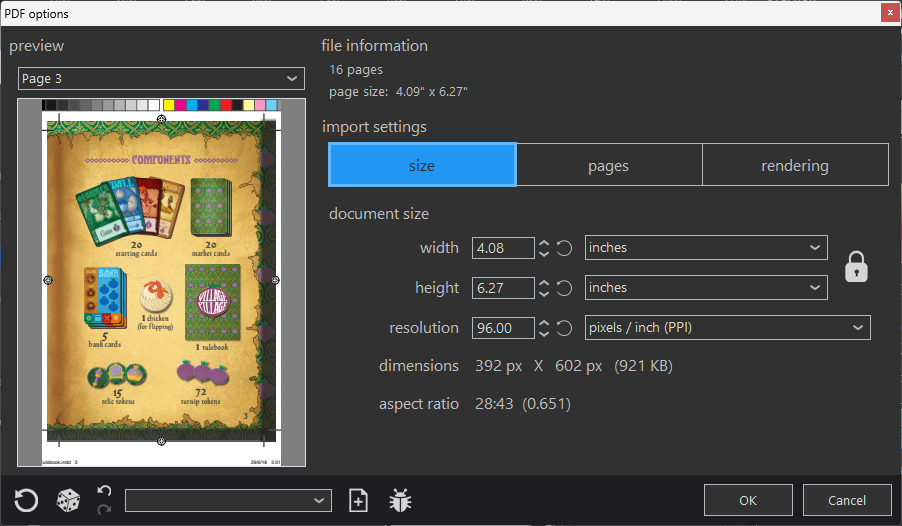
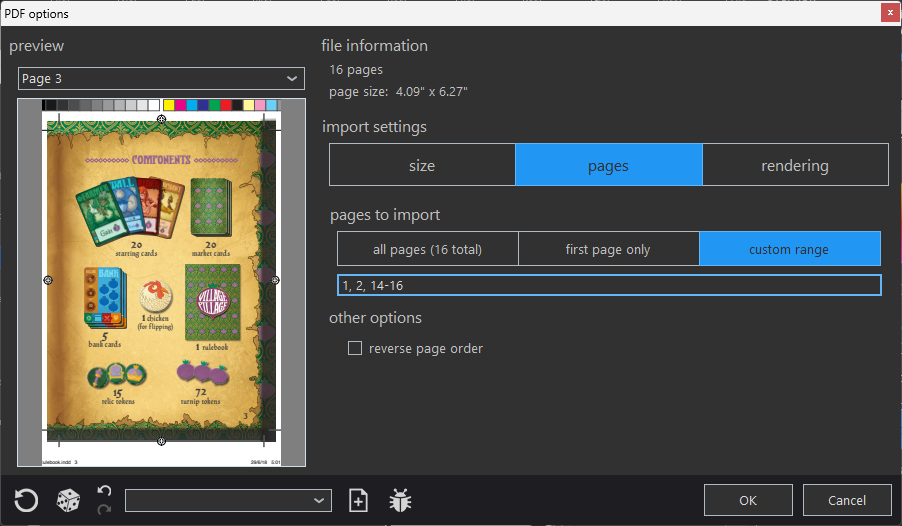
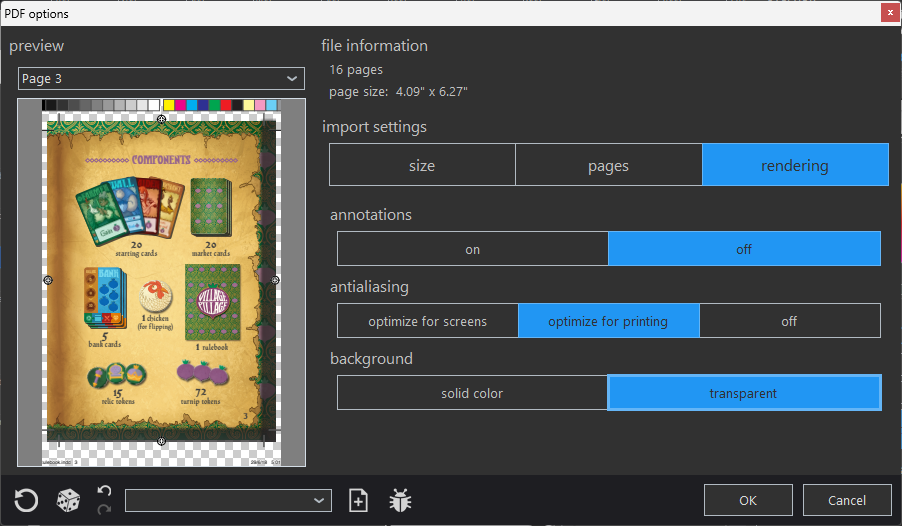
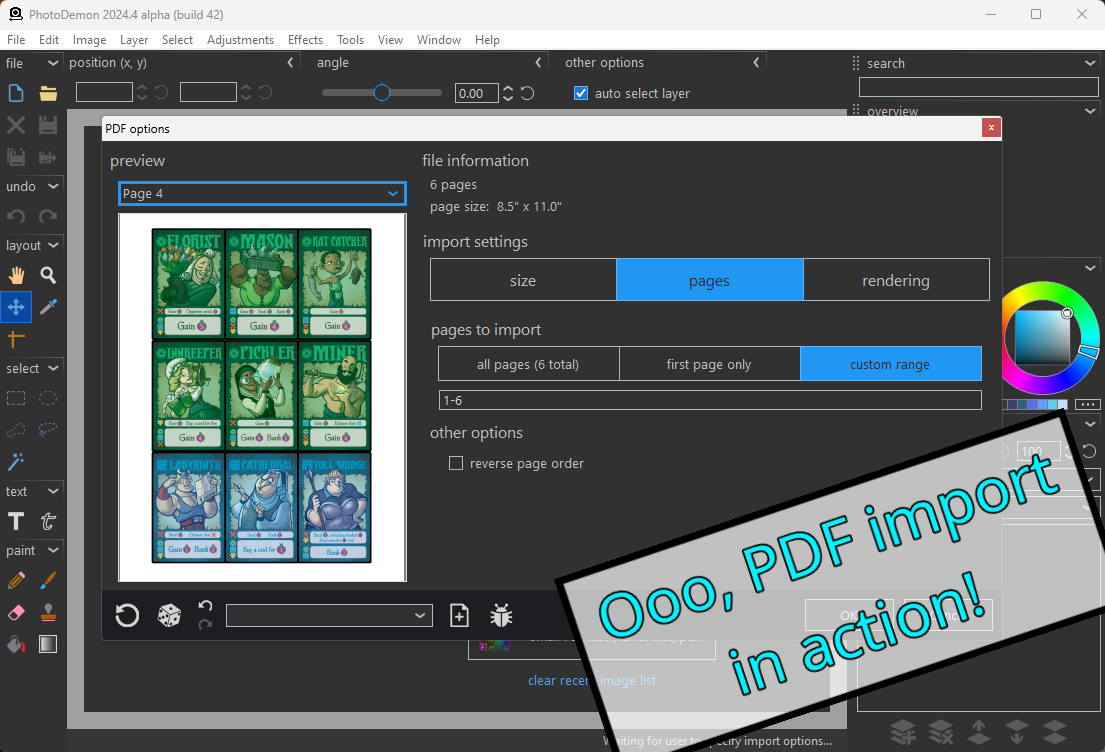
<p>PhotoDemon can now import PDF documents as if they were image files.  Each page can be imported to its own layer.</p>

<p>Detailed control is provided over document size and resolution…</p>

<p><img src="media/images/pdf-import-1.png" alt="pdf-import-size" />
<em>(The PDF in these examples is <a href="https://boardgamegeek.com/boardgame/247342/village-pillage">the free print-and-play PDF of the “Village Pillage” card game</a>.)</em></p>

<p>…which pages you import (including arbitrary page ranges)…</p>

<p><img src="media/images/pdf-import-2.png" alt="pdf-import-pages" /></p>

<p>…and document rendering settings, including full support for annotations, page transparency, and antialiasing.</p>

<p><img src="media/images/pdf-import-3.png" alt="pdf-import-rendering" /></p>

<p>PDF export is still a work in progress.  It will arrive in a future release.</p>

<h3 id="save-and-load-jpeg-xl-images">Save and load JPEG-XL images</h3>

<p>JPEG-XL images (.jxl) may eventually become the next-generation replacement for traditional JPEG images.  The JPEG-XL format provides higher quality than traditional JPEGs at potentially smaller file sizes.  JPEG-XL also supports a variety of new features, including HDR, animations, and more.</p>

<p>Unfortunately, like all attempts to replace the venerable JPEG format, the JPEG-XL format is extremely complex and ever-evolving.  Support for the format in other software is mixed, and some companies (<a href="https://arstechnica.com/gadgets/2023/04/free-software-group-decries-google-dropping-space-saving-jpeg-xl-format/">Google, notably</a>) have dropped support due to ongoing problems.  At this point, no one knows if JPEG-XL will ultimately replace JPEGs or if it will remain an academic curiosity.</p>

<p>One of the biggest problems with the current JPEG-XL reference library is that errors can <a href="https://github.com/libjxl/libjxl/issues/1450">completely crash both the library any apps using it</a>, a problem that has existed for years.  The format also has much larger memory and performance needs than traditional JPEGs, so it is best used on higher-end devices.</p>

<p>With these caveats in mind, you can now load and save JPEG-XL files in PhotoDemon.  To prevent the JPEG-XL reference library from crashing PhotoDemon itself, JPEG-XL support is available as a separate, optional install.  If you are on a compatible operating system (Windows 7 or later) and you try to load or save a JPEG-XL file, PhotoDemon will offer to download and configure a portable copy of the JPEG-XL reference library.  This one-time download will permanently enable JPEG-XL support for that PhotoDemon instance.</p>

<p>If you choose to enable JPEG-XL support, PhotoDemon can periodically look for updated copies of the library.  It will prompt you for updates (when interacting with JPEG-XL images) as your PhotoDemon settings allow.  This should lead to improved JPEG-XL compatibility and performance over time.</p>

<h3 id="additional-image-format-improvements">Additional image format improvements</h3>

<p>PDFs and JPEG-XL images are not the only new formats supported by this release.  Additional improvements include:</p>

<ul>
  <li><a href="https://en.wikipedia.org/wiki/Wireless_Application_Protocol_Bitmap_Format">WBMP images</a> can now be <a href="https://github.com/tannerhelland/PhotoDemon/commit/b31d68a56d773440e6b482fbbcc136110489e56d">imported and exported</a>.  (This format is ancient and not especially relevant in 2024, but Photoshop supports it natively so PhotoDemon should too!)</li>
  <li><a href="https://en.wikipedia.org/wiki/X_BitMap">XBM images</a> can now be <a href="https://github.com/tannerhelland/PhotoDemon/commit/a1b3e225631f77b176df520d430ad08657ba8981">imported</a>.  (This format is ancient and not especially relevant in 2024, but GIMP supports it natively so PhotoDemon should too!)</li>
  <li>Photoshop (PSD) file support continues to <a href="https://github.com/tannerhelland/PhotoDemon/commit/8a7bd8120aad2ce73922fb4b277fce3fe7f6a663">improve with every release</a>.</li>
  <li><a href="https://en.wikipedia.org/wiki/Lossless_JPEG">Lossless JPEG (JPEG-LS)</a> support has been expanded and improved.</li>
  <li>OpenRaster (ORA) and comic book archives (CBZ) now support <a href="https://github.com/tannerhelland/PhotoDemon/commit/9fcbf98c3e517c7c29bffd55fba99398008d3092">Zip64-encoded files</a>.</li>
  <li>SVG support has seen a number of <a href="https://github.com/tannerhelland/PhotoDemon/commit/36aa245e7cc2b1051f775efe60299679ed13ac2e">performance and feature improvements</a>, and SVGs can now be <a href="https://github.com/tannerhelland/PhotoDemon/commit/d69936f3fde1535c8bb9c17305aba6061c9cd4eb">batch-converted to other formats</a>.</li>
  <li>EMF and WMF images now support <a href="https://github.com/tannerhelland/PhotoDemon/commit/18812e6ef7d552b3da6ce430cbb0613316e8e63e">custom size at import-time (and batch process support)</a>.</li>
  <li>Icon (ICO) files have seen many improvements, including <a href="https://github.com/tannerhelland/PhotoDemon/issues/453">quality improvements and new features</a> when creating icons from scratch.</li>
  <li>WebP images received <a href="https://github.com/tannerhelland/PhotoDemon/commit/71062a92848d80df593f8f4b7767f9d3e472c21a">security and performance improvements</a>.</li>
  <li>Like JPEG-XL images, AVIF images also lean on third-party libraries (due to the complexity of the format).  PhotoDemon can also auto-update the required AVIF libraries <a href="https://github.com/tannerhelland/PhotoDemon/commit/4256c717019c7f8d5ba61cb7946bd45bd1d1c347">independently from PhotoDemon itself</a>.</li>
</ul>

<h3 id="magnetic-snapping-and-smart-guides-for-the-move-tool">“Magnetic” snapping and smart guides for the <strong>Move</strong> tool</h3>

<p>Precisely aligning layers is now much easier, thanks to the addition of “magnetic” snapping and smart guides.</p>

<p>This is one of those features where an image is probably worth a thousand words:</p>

<p><img src="media/images/photodemon-2024-snap-and-smart-guides.png" alt="snap-and-smart-guides" /></p>

<p>“Magnetic” snapping works by automatically aligning layer boundaries (and/or center lines, optionally) to other nearby objects.  It works on all layer types and can align to canvas edges, nearby layers, or object center lines.  (Each of these options can be independently toggled from the <code class="language-plaintext highlighter-rouge">View &gt; Snap to</code> menu.)</p>

<p>“Smart guides” are the blue lines that appear when an object is snapped.  They display which boundaries are being snapped together.  You can toggle these from the <code class="language-plaintext highlighter-rouge">View &gt; Show extras &gt; Smart guides</code> menu.</p>

<p><em>All</em> snapping options can be toggled on/off using the <code class="language-plaintext highlighter-rouge">View &gt; Snap</code> menu.</p>

<h3 id="move-tool-can-now-show-distances"><strong>Move</strong> tool can now show distances</h3>

<p>In conjuction with snapping and smart guides, the <code class="language-plaintext highlighter-rouge">Move tool</code> can now show precise distances when moving objects:</p>

<p><img src="media/images/photodemon-2024-show-distances.png" alt="show-distances" /></p>

<p>This feature can be enabled independently of snapping, using the <code class="language-plaintext highlighter-rouge">Move tool &gt; other options &gt; show distances</code> check box.</p>

<p>In related news, the <code class="language-plaintext highlighter-rouge">show layer boundaries</code> setting has moved from the <code class="language-plaintext highlighter-rouge">Move tool</code> to the <code class="language-plaintext highlighter-rouge">View &gt; Show extras &gt; Layer edges</code> menu.  This matches Photoshop’s behavior, and now allows you to see layer boundaries even when using other tools.</p>

<h3 id="redesigned-and-expanded-file--export-menu">Redesigned and expanded <strong>File &gt; Export</strong> menu</h3>

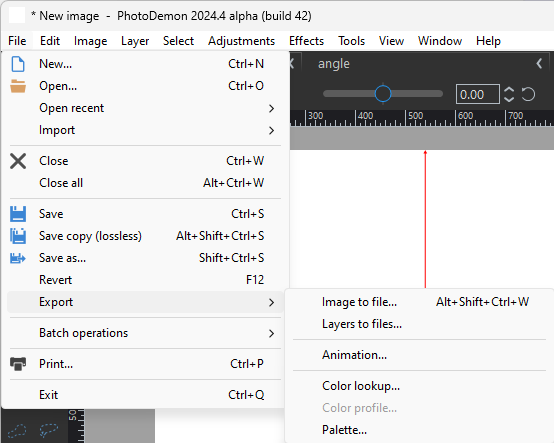
<p>The <code class="language-plaintext highlighter-rouge">File &gt; Export</code> menu is greatly improved in this release:</p>

<p><img src="media/images/photodemon-2024-file-export-menu.png" alt="file-export" /></p>


<p>The old format-specific animation menus have been condensed into a single <code class="language-plaintext highlighter-rouge">Export &gt; Animation</code> menu, and new options exist for exporting the current image to a standalone file, or individual layer(s) to standalone files.</p>

<p>Exporting the current image to file does <em>not</em> update its save state (so if it has changes, you will still receive a “do you want to save changes” warning when you close it).  This is useful for saving an image to a layered format while you work, but periodically exporting it to a flat or lossy format like JPEG.</p>

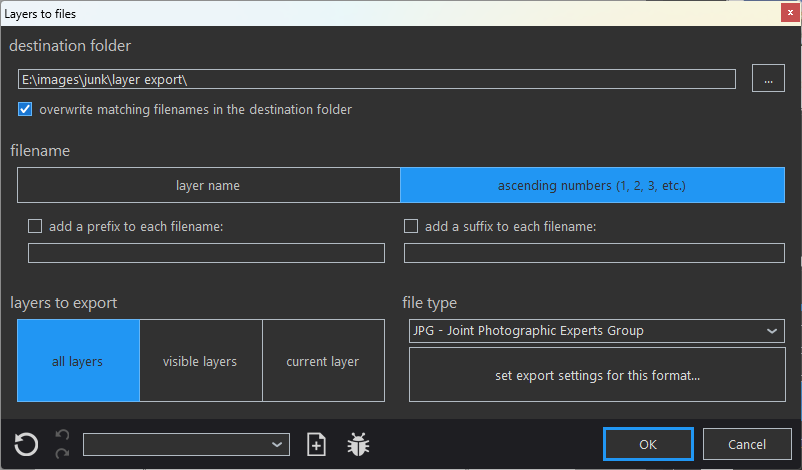
<p>Exporting layers to file provides many options for how the layers are exported:</p>

<p><img src="media/images/photodemon-file-export-layers.png" alt="export-layers" /></p>

<p>This feature was designed to be similar to Photoshop’s implementation, and it is especially useful for tasks like exporting all frames from an animation, or all pages from a PDF, to individual image files.</p>

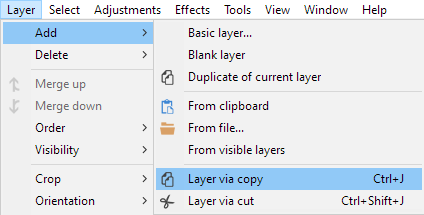
<p>(In similar news, the <code class="language-plaintext highlighter-rouge">Layer &gt; Add &gt; From file</code> menu now supports adding multiple layers at once, so you can easily re-assemble separate image files into a single layered image.)</p>

<h3 id="file--save-and-file--save-as-improvements"><strong>File &gt; Save</strong> and <strong>File &gt; Save as</strong> improvements</h3>

<p>The <code class="language-plaintext highlighter-rouge">File &gt; Save</code> and <code class="language-plaintext highlighter-rouge">File &gt; Save as</code> menus are possibly the most important menus in an application, and PhotoDemon’s <code class="language-plaintext highlighter-rouge">Save/Save as</code> menus have picked up some new smarts since the last release.</p>

<p><a href="https://github.com/tannerhelland/PhotoDemon/issues/472">Manually entered file extensions are now detected</a>, and PhotoDemon will automatically redirect the save operation to the appropriate save format.  This means you no longer need to interact with the file format dropdown if you don’t want to.</p>

<p>Additionally, the <code class="language-plaintext highlighter-rouge">Tools &gt; Options</code> menu now provides <a href="https://github.com/tannerhelland/PhotoDemon/commit/4630df0eb9d0524919eafb8e527f6531db5bd1f2">additional control over <code class="language-plaintext highlighter-rouge">Save as</code> filename behavior</a>.  You can now set <code class="language-plaintext highlighter-rouge">Save as</code> to automatically increment the target filename (e.g. if <code class="language-plaintext highlighter-rouge">image file.png</code> exists, PhotoDemon will suggest <code class="language-plaintext highlighter-rouge">image file (2).png</code>), or simply reuse the last filename as-is.  The same option exists for <code class="language-plaintext highlighter-rouge">File &gt; Save</code> operations.</p>

<h3 id="right-click-menus-for-the-layer-toolbox">Right-click menus for the layer toolbox</h3>

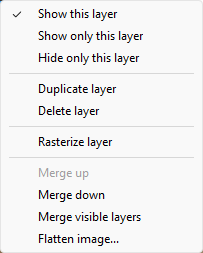
<p>As has long been requested, PhotoDemon now provides a comprehensive right-click menu for the layer toolbox:</p>

<p><img src="media/images/layer-toolbox-right-click.png" alt="export-layers" /></p>

<p>It’s a little silly that it took me so long to add this feature, but in my defense, the toolkit PhotoDemon is built with does not support Unicode text, so I had to write a right-click menu system from scratch in order to display languages like Japanese or Chinese.</p>

<p>Anyway, you should know the official PhotoDemon motto by now - better late than never!</p>

<h3 id="new-advanced-text-layer-features">New <strong>Advanced text layer</strong> features</h3>

<p>PhotoDemon provides two text tools: a “basic” one that relies on native Windows text rendering, and an “advanced” text tool that uses a custom renderer with many additional features.</p>

<p>The <code class="language-plaintext highlighter-rouge">advanced text tool</code> now supports justified text alignment, rendering text outline and fill in either order (outline above or below fill), and additional antialiasing settings to bring it closer to parity with Photoshop’s text tool.</p>

<p>I am also actively working on “styles” support for both text tools, which will allow you to save all text settings as singular presets.  Unfortunately, this feature isn’t quite ready for release, but look for it later this year.</p>

<h3 id="many-updates-to-localization-files-and-features">Many updates to localization files and features</h3>

<p>Like every new PhotoDemon release, all language files have all seen numerous updates and improvements thanks to many generous volunteers.  Thank you to everyone who contributes to PhotoDemon’s extensive localization support.</p>

<p>This is also the first PhotoDemon release to ship with full Japanese language support.  Thank you to Kenji Hoshimoto for this contribution!</p>

<h2 id="additional-upgrades-and-improvements">Additional upgrades and improvements.</h2>

<p>Those are some of the biggest improvements available in PhotoDemon 2024.7, but they are far from the only ones.</p>

<p>Here is an abbreviated list of other highlights in the 2024.7 release.</p>

<ul>
  <li>Copy + Paste now <a href="https://github.com/tannerhelland/PhotoDemon/commit/c4beae550d38554b5c71b6bc3c4cbe0f67eda776">retains editable text layers</a>.</li>
  <li>A number of UI animations now <a href="https://github.com/tannerhelland/PhotoDemon/commit/5f52283f29fe27c7b652d9309ec3dd3b4f2902e5">use adaptive frame rates</a> for more fluidity on high-end systems, and better responsiveness on low-end systems.</li>
  <li>Rulers (and distance displays on the Move tool) can now use <a href="https://github.com/tannerhelland/PhotoDemon/commit/406fd150d5eb1e44d32655e2b12725df72798087"><code class="language-plaintext highlighter-rouge">Percent</code> as a measurement option</a>.</li>
  <li>The main window now allows you to <a href="https://github.com/tannerhelland/PhotoDemon/commit/c75966872d7347d15cf483aefef3beb9345f31cb">drag+drop files onto more UI targets</a>.</li>
  <li><a href="https://github.com/tannerhelland/PhotoDemon/commit/c3840d940ba19700cf652693ff327cf6c912e6d1">“Behind” is now available as a blend mode</a>, allowing you to paint “behind” a given layer.</li>
  <li>The 3rd-party ExifTool library (used to handle image metadata) has seen many updates, and it is now capable of <a href="https://github.com/tannerhelland/PhotoDemon/commit/e2b011560e8b4793c36b39688550d340610f58c3">in-place upgrades</a>.</li>
  <li><code class="language-plaintext highlighter-rouge">Layers &gt; Add &gt; from File</code> now supports adding multiple files at once</li>
  <li>32-bit Photoshop filters have received <a href="https://github.com/tannerhelland/PhotoDemon/commit/4d3c2a8319bdfc0ecbc0f0c0e07a6904fb36830d">expanded support</a>.</li>
  <li>The <code class="language-plaintext highlighter-rouge">Hand tool</code> now natively supports <a href="https://github.com/tannerhelland/PhotoDemon/commit/39a39f4f9bbd6a950c46bdaf5e54202320d95e8e">arrow key movement</a>.</li>

  <li><code class="language-plaintext highlighter-rouge">Effects &gt; Transform &gt; Perspective</code> now supports <a href="https://github.com/tannerhelland/PhotoDemon/commit/27f6d12242fad25e14b0226831d88fdd4ee7dc31">custom forshortening</a>.</li>
  <li>Running PhotoDemon under Linux has improved thanks to <a href="https://github.com/tannerhelland/PhotoDemon/commit/b8ee65f3276c577a683259022bad22d5d064736f">better Wine support</a>.</li>
  <li>Windows XP support <a href="https://github.com/tannerhelland/PhotoDemon/commit/8b339413e4604a568c829df9f42e52aacd786d51">has improved</a>, particularly its behavior with 3rd-party libraries that have XP-specific limitations.</li>
</ul>

<h3 id="other">Other</h3>

<p>These are just the highlights of version 2024.7.  For an exhaustive list of changes, <a href="https://github.com/tannerhelland/PhotoDemon/commits/main">review the project’s commit log</a>.</p>

<h2 id="in-conclusion">In conclusion</h2>

<p>Thank you for using PhotoDemon.</p>

<p>I am so grateful to everyone who contributed to this release, whether through Patreon, GitHub, or by sending old-fashioned emails.  A full list of contributors is available on <a href="contributors/">the Contributors page</a>, or in the <code class="language-plaintext highlighter-rouge">Help &gt; About</code> menu of PhotoDemon itself.  PhotoDemon’s ever-expanding community is full of amazing individuals, and they are the reason I can give the software away for free.</p>

<p>If you find PhotoDemon useful, <strong><a href="donate/">please consider making a small one-time donation</a></strong> or <strong><a href="https://www.patreon.com/photodemon">joining our Patreon family</a></strong>.  I’d love to add you to the next contributor list.</p>

<p>I hope you enjoy version 2024.7, and I’ll be back later this year with even more new features and improvements.  See you then!</p>]]></content><author><name>Tanner Helland</name><email>tannerhelland@gmail.com</email></author><summary type="html"><![CDATA[A new PhotoDemon release is here! As part of a commitment to more frequent releases, PhotoDemon now uses calendar versioning. The new 2024.7 release includes many new features and improvements, including JPEG-XL support, PDF support (import only, export coming soon!), "magnetic" object snapping and smart guides, a greatly expanded `File > Export` menu, improved PSD compatibility, Japanese language support, and much more.]]></summary></entry><entry><title type="html">PhotoDemon 9.0 is here</title><link href="https://photodemon.org/2022/09/08/photodemon-9-0.html" rel="alternate" type="text/html" title="PhotoDemon 9.0 is here" /><published>2022-09-08T12:00:00+00:00</published><updated>2022-09-08T12:00:00+00:00</updated><id>https://photodemon.org/2022/09/08/photodemon-9-0</id><content type="html" xml:base="https://photodemon.org/2022/09/08/photodemon-9-0.html"><![CDATA[<p><img src="media/images/photodemon_9.0.png" alt="screen-capture" /></p>

<h2 id="overview">Overview</h2>

<p>After two years of work, PhotoDemon 9.0 is available to download. Highlights of this release include an improved user interface, new best-in-class selection tools (including support for multiple selections), support for many new image formats (AVIF, Paintshop Pro (PSP), GIMP (XCF), SVG, and more), content-aware fill, new filters and effects, and so much more.</p>

<p>Like all PhotoDemon releases, PhotoDemon 9.0 runs on any Windows PC sold in the past 20 years.  All modern versions of Windows (XP through the latest Windows 11 insider builds) are fully supported.</p>

<h2 id="download-the-new-release">Download the new release</h2>

<p>If you already have a copy of PhotoDemon, you’re good to go!  PhotoDemon will automatically update according to your preference in the <code class="language-plaintext highlighter-rouge">Tools &gt; Options &gt; Updates</code> menu.</p>

<p>If you want to manually download a fresh copy, <strong><a href="https://github.com/tannerhelland/PhotoDemon/releases/download/v9.0/PhotoDemon-9.0.zip">click here</a></strong> or <strong><a href="download/">visit the download page</a></strong>.</p>

<h2 id="special-thanks">Special thanks</h2>

<p>This release was a monumental effort, and it exists thanks to many wonderful contributors who donated money, time, and feedback to the project.</p>

<p>If you find PhotoDemon useful, <strong><a href="donate/">please consider making a small donation</a></strong>.  Your support makes this 100% free, 100% open-source project possible.</p>

<p><strong><a href="https://www.patreon.com/photodemon">Thank you especially to all of PhotoDemon’s Patreon supporters</a></strong>.  Thank you also to everyone who has made a <a href="donate/">one-time donation</a>.</p>

<p>Finally, thank you to everyone who contributed translations, bug reports, ideas, and feedback to this release, particularly during the 9.0 beta.  I am grateful to all of you.  ❤</p>

<h2 id="whats-new-and-improved-in-this-release">What’s new and improved in this release</h2>

<p>Some of these new features were discussed in great detail in the <a href="http://localhost:4000/2022/02/23/photodemon-2021-year-in-review.html">2021 year in review article</a>, so head there for an even deeper dive.</p>

<p>Otherwise, read on for a (very) long list of all the exciting changes you’ll find in PhotoDemon 9.0.</p>

<h3 id="a-quick-bonus-before-we-begin">A quick bonus, before we begin…</h3>

<p>Let me quickly share one extra surprise about PhotoDemon 9.0.</p>

<p>Despite providing many more tools, adjustments, and effects than PhotoDemon 8.4, PhotoDemon 9.0 actually uses <em>fewer</em> system resources than 8.4.  Here is a Task Manager screenshot comparing the cold-start memory and resource usage between both versions:</p>

<p><img src="media/images/photodemon_9.0_resource_usage.png" alt="task manager screenshot" /></p>

<p>That’s a 12% memory reduction, 21% <a href="https://en.wikipedia.org/wiki/Handle_(computing)">system handle</a> reduction, and 36% reduction in <a href="https://en.wikipedia.org/wiki/Graphics_Device_Interface">system graphics objects</a>.  As you start working with images, 9.0’s lower memory consumption is even more pronounced.</p>

<p>I just wanted to mention this up front because unlike other software, I try to make PhotoDemon <strong>smaller</strong>, <strong>lighter</strong>, and <strong>faster</strong> with each release.  So as you read about all the fun new features in version 9.0, remember that these improvements won’t bog down your PC - in fact, PhotoDemon will run even better than it did before.</p>

<h3 id="a-revised-and-improved-primary-user-interface">A revised and improved primary user interface</h3>

<p>In version 9.0, PhotoDemon’s primary interface now gives you more room to work.</p>

<p><img src="media/images/new-toolpanels.webp" alt="new-toolpanels" /></p>

<p>Tool options are now top-aligned against the menu bar, like other popular photo editors.  The most common settings appear directly on the toolbar, and extended options live in well-organized flyout panels.</p>

<p>These flyout panels automatically disappear when you interact with the canvas.  If you want ongoing access to a particular panel, you can click the “pin” icon in its bottom-right to keep it open.</p>

<p>This new UI takes up less than half the vertical space of the old design, while still providing one-click access to PhotoDemon’s many tool options.</p>

<p>This new interface is designed to work all the way down to ancient display resolutions (e.g. 1024x768), but if you have a modern display, some tools can automatically move advanced settings back into the toolbar itself as space allows.  This animation shows an “opacity” setting automatically moving between a flyout panel (below brush size) and the toolbar itself as the main PhotoDemon window is resized:</p>

<p><img src="media/images/toolpanel-autosize.webp" alt="toolpanel-autosize" /></p>

<h3 id="best-in-class-selection-tools-including-composite-selections">Best-in-class selection tools, including composite selections</h3>

<p>PhotoDemon has always supported editable selections.  After creating a selection, you can further refine it by click-dragging the selection’s corners or sides, or use text boxes for precision adjustments.</p>

<p>PhotoDemon’s editable selections now come with multi-selection support.  You can combine selections using Add, Subtract, and Intersect modes, and your last selection remains editable <strong>even when multiple selections are active</strong>.  For example, here is a lasso selection merging with previous rectangle and ellipse selections in real-time:</p>

<p><img src="media/images/combine-selections-new.webp" alt="multiple-selections" /></p>

<p>Honestly, this feature was a nightmare to develop, but I really wanted PhotoDemon to provide a best-in-class selection tool experience.  I hope this release meets that goal.</p>

<h3 id="content-aware-fill-for-smart-object-removal">Content-aware fill for smart object removal</h3>

<p>Building on these new selection tool features, PhotoDemon now ships with a powerful content-aware fill tool.  (This feature is also called “smart object removal” or “inpainting”.)</p>

<p>Simply select one or more objects that you want to remove from a photo, click <code class="language-plaintext highlighter-rouge">Edit &gt; Content-aware fill</code> (or <code class="language-plaintext highlighter-rouge">Select &gt; Heal selected area</code> if you prefer) and PhotoDemon takes care of the rest.</p>

<p><img src="media/images/content-aware-fill.webp" alt="content-aware-fill" /></p>

<p>PhotoDemon’s content-aware fill has no restrictions.  It works with <strong>all</strong> selection tools on <strong>any</strong> PC - yes, even on Windows XP.</p>

<p>The default settings work well in most conditions, but as you can see in the animation above, power users can further tweak the tool’s behavior.  For example, in this panorama photo with missing pixels, I ask the inpainter to avoid sampling pixels to the left.  This prevents the darker clouds on that side from bleeding into the lighter clouds I want to match:</p>

<p><img src="media/images/content-aware-fill-panorama.webp" alt="content-aware-fill" /></p>

<p>Unlike other software, PhotoDemon’s content-aware fill does not rely on “AI” or other silly buzzwords.  It does not require an internet connection or a database of training images.  Instead, it studies each photo as-is, constructs different possible textures from nearby regions of the image, then repeatedly refines the result until it arrives at a result it “likes”.</p>

<p>I emphasize this because PhotoDemon’s content-aware fill is deliberately <a href="https://en.wikipedia.org/wiki/Nondeterministic_algorithm">non-deterministic</a>.  If you don’t like its results, no problem!  Just run the tool again and it will try a new approach.  Running it several times in quick succession may produce better results than running it once, and afterwards you can step through the different fill results using Undo/Redo.</p>

<p>For example, here’s me using this strategy on the beach photo from before, but repeating the tool a few times to see different results:</p>

<p><img src="media/images/content-aware-fill-retry.webp" alt="content-aware-fill" /></p>

<h3 id="in-depth-support-for-many-new-image-formats">In-depth support for many new image formats</h3>

<p>Expanded image support was a large focus of this release.  PhotoDemon now provides:</p>

<ul>
  <li>Import and export support for Corel Paintshop Pro (<strong>PSP</strong>) images.  The new importer can even preserve PSP text layers as editable text layers inside PhotoDemon!</li>
  <li>Import support for GIMP (<strong>XCF</strong>) images, including comprehensive coverage of layers in all color modes, integer and float precisions, and GIMP versions.</li>
  <li>Import and export support for the brand-new <a href="https://en.wikipedia.org/wiki/AV1#AV1_Image_File_Format_(AVIF)"><strong>AVIF</strong> file format</a>, c/o the <a href="https://github.com/AOMediaCodec/libavif">open-source libavif library</a>.  AVIF file support is incredibly complex (the stock encoder+decoder apps are 3x larger than PhotoDemon!) and they are only available for 64-bit systems, so PhotoDemon does not ship these libraries by default.  If you attempt to open or save an AVIF file on a compatible PC, PhotoDemon will offer to automatically download and configure a portable copy of libavif.</li>
  <li>Import and export support for <strong>animated WebP</strong> images.  Many of the screen capture animations on this page were created with this feature.</li>
  <li>Import support for <a href="https://en.wikipedia.org/wiki/Scalable_Vector_Graphics"><strong>SVG and SVGZ</strong> images</a>, c/o the <a href="https://github.com/RazrFalcon/resvg">open-source resvg library</a>.</li>
</ul>

<p>Other new formats supported by PhotoDemon include lossless JPEG (<strong>JPEG-LS</strong>), comic book archives (<strong>CBZ</strong>), old Symbian images (<strong>MBM</strong>, <strong>AIF</strong>), and lossless “quite OK” (<strong>QOI</strong>) images.</p>

<p>In other image format news, PhotoDemon now includes a best-in-class <a href="https://github.com/tannerhelland/PhotoDemon/commit/aaab70c06a0697b56d0336e22477782b9af59093">automatic GIF optimizer</a>, and image formats that require palettes (like GIFs) benefit from a new <a href="https://github.com/tannerhelland/PhotoDemon/commit/fc27cfc6a5ce7ab42a7d929e80e220281c818bb6">neural-network color quantizer</a> that constructs extremely high-quality palettes, even at low color counts.</p>

<p><img src="media/images/neural_network_color_map.png" alt="neural_network_color_map" /></p>

<h3 id="best-in-class-image-resize-tool">Best-in-class Image Resize tool</h3>

<p>PhotoDemon’s <code class="language-plaintext highlighter-rouge">Image &gt; Resize</code> tool now provides twelve advanced resampling modes.  Even better, all modes support live interactive previews, so you no longer have to guess at the “best” resampling mode for your needs:</p>

<p><img src="media/images/new-resize.webp" alt="new-resize" /></p>

<p>Live previews work with both upsampling and downsampling, and all resampling modes provide high-speed (integer) and high-precision (floating point) versions.  If you don’t want to mess with any of these intricacies, a smart “automatic” mode automatically chooses reasonable settings for you.</p>

<p>With these improvements, I believe PhotoDemon provides the best image resize experience of any free photo editor.</p>

<h3 id="built-in-support-for-adobe-photoshop-plugins-8bf">Built-in support for Adobe Photoshop plugins (8bf)</h3>

<p>PhotoDemon now provides native support for <a href="https://en.wikipedia.org/wiki/Photoshop_plugin">Photoshop effect plugins</a> (“8bf”, 32-bit only).  This feature is possible thanks to <a href="https://github.com/spetric/Photoshop-Plugin-Host">spetric’s Photoshop-Plugin-Host library</a>.</p>

<p>For example, here is Photoshop 5.0’s “Texturize” filter running natively within PhotoDemon:</p>

<p><img src="media/images/8bf_filter.png" alt="screen-capture" /></p>

<h3 id="new-color-lookup-adjustment-with-full-support-for-3d-lookup-table-lut-files">New Color Lookup adjustment, with full support for 3D Lookup Table (LUT) files</h3>

<p>Color lookup files (commonly called 3D LUTs, because they store <strong>3</strong>-<strong>D</strong>imensional <strong>L</strong>ook-<strong>U</strong>p <strong>T</strong>ables) are used extensively in film, photography, and game development.  These files encode any combination of color adjustments, including all the tools from PhotoDemon’s (extensive) <code class="language-plaintext highlighter-rouge">Adjustments</code> menu.</p>

<p>PhotoDemon now provides full support for 3D LUTs in the new <code class="language-plaintext highlighter-rouge">Adjustments &gt; Color &gt; Color lookup</code> menu.  3DL, CUBE, and LOOK formats are supported at any complexity.  PhotoDemon also ships with a free set of color lookups that mimic your favorite one-click social media filters:</p>

<p><img src="media/images/color-lookup.webp" alt="color-lookup" />
<em>Bryce Canyon photo by <a href="https://www.flickr.com/photos/daniellambson/51490498024/in/pool-brycecanyonnps/">Daniel Lambson</a></em></p>

<p>You can also make your own 3D LUT files.  Just load a photo and apply any combination of adjustments, then use the new <code class="language-plaintext highlighter-rouge">File &gt; Export &gt; Color lookup</code> tool to save your changes to 3DL, CUBE, or LOOK format.  That combination of adjustments are now ready to use in Adobe Photoshop or any other LUT-capable photo editor - even if those photo editors don’t provide the same adjustment features as PhotoDemon!</p>

<p>You can also search online for “free 3D LUTs” to find more color adjustments than any human being could ever need or want.  (There are also many paid LUT offerings, if you’re into that.)</p>

<p>I believe PhotoDemon is the first free, open-source photo editor to provide full coverage for all major 3D LUT formats.  This is also a relatively recent addition to Photoshop, so it’s exciting to include it here for free!</p>

<h2 id="full-list-of-changes-by-category">Full list of changes by category</h2>

<p>Those are some of the biggest improvements coming to PhotoDemon 9.0, but they are far from the only ones.  (I haven’t even gotten to new effects yet!)</p>

<p>It would take too long to discuss every new feature at this same level of detail, so here is an abbreviated list of other highlights in the 9.0 beta.</p>

<h3 id="effects">Effects</h3>

<ul>
  <li>New <a href="https://github.com/tannerhelland/PhotoDemon/pull/399"><code class="language-plaintext highlighter-rouge">Effects &gt; Light and shadow &gt; Bump map</code></a> tool.</li>
</ul>

<p><img src="media/images/bump-map.webp" alt="bump-map" /></p>

<ul>
  <li>New <a href="https://github.com/tannerhelland/PhotoDemon/pull/364"><code class="language-plaintext highlighter-rouge">Effects &gt; Distort &gt; Droste</code></a> tool, so you can channel your inner <a href="https://en.wikipedia.org/wiki/Print_Gallery_(M._C._Escher)">M.C. Escher</a>.</li>
</ul>

<p><img src="media/images/effect_distort_droste.png" alt="effect_distort_droste" /></p>

<ul>
  <li>New <a href="https://github.com/tannerhelland/PhotoDemon/pull/358"><code class="language-plaintext highlighter-rouge">Effects &gt; Render &gt; Truchet Tiles</code> tool</a>.</li>
</ul>

<p><img src="media/images/effect_render_truchet.png" alt="effect_render_truchet" /></p>

<ul>
  <li>New <code class="language-plaintext highlighter-rouge">Effects &gt; Animation menu</code>, including new <a href="https://github.com/tannerhelland/PhotoDemon/commit/06a4f1df3a5231eb0cac17dd7f426a049e44f7e7">Foreground and Background effects</a> (for automatically applying a background or foreground layer to an animated image) and an <a href="https://github.com/tannerhelland/PhotoDemon/pull/400">Animation speed effect</a> (for permanently modifying playback speed).</li>
</ul>

<p><img src="media/images/effects_animation_foreground.png" alt="effects_animation_foreground" /></p>

<ul>
  <li>New <a href="https://github.com/tannerhelland/PhotoDemon/commit/f7e28487c087f1483dac435290ab3c30f7c18ac0"><code class="language-plaintext highlighter-rouge">Effects &gt; Edge &gt; Gradient flow</code></a> tool</li>
</ul>

<p><img src="media/images/gradient_flow.png" alt="gradient_flow" /></p>

<ul>
  <li>Greatly improved <code class="language-plaintext highlighter-rouge">Effects &gt; Transform &gt; Perspective</code> tool, with new live preview support and precision control for corner coordinates.</li>
</ul>

<p><img src="media/images/effect_transform_perspective.webp" alt="effect_transform_perspective" /></p>

<ul>
  <li>Greatly improved and accelerated <a href="https://github.com/tannerhelland/PhotoDemon/commit/02f60a5c6807cec763fcfb7628332b9b6de897f2"><code class="language-plaintext highlighter-rouge">Effects &gt; Artistic &gt; Stained Glass</code></a> and <a href="https://github.com/tannerhelland/PhotoDemon/commit/ac2772d145a30b5e1a4bccd334c642062f63708c"><code class="language-plaintext highlighter-rouge">Effects &gt; Pixelate &gt; Crystallize</code></a> tools</li>
</ul>

<p><img src="media/images/effect_artistic_stained_glass.webp" alt="effect_artistic_stained_glass" /></p>

<h3 id="adjustments">Adjustments</h3>

<ul>
  <li>New <a href="https://github.com/tannerhelland/PhotoDemon/commit/dde19d0c6e45b41f9c0d88d6d7c62a4651595836"><code class="language-plaintext highlighter-rouge">Adjustments &gt; Lighting &gt; Dehaze</code> tool</a>, for recovering photos marred by haze or fog.</li>
</ul>

<p><img src="media/images/adjustments_lighting_dehaze.png" alt="adjustments_lighting_dehaze" /></p>

<ul>
  <li>Overhauled <a href="https://github.com/tannerhelland/PhotoDemon/commit/989f861d8cf4b32e5a49c10cc87c094cc7f38b33"><code class="language-plaintext highlighter-rouge">Adjustments &gt; Curves</code> tool</a>, with improved performance and a new UI.</li>
</ul>

<p><img src="media/images/adjustments_curves.png" alt="adjustments_curves" /></p>

<ul>
  <li>Completely redesigned <a href="https://github.com/tannerhelland/PhotoDemon/commit/f142633977c1eed9f627f6ab6ab84053960914a1"><code class="language-plaintext highlighter-rouge">Adjustments &gt; Color &gt; Photo filter</code></a> tool, to better match Photoshop’s implementation.</li>
</ul>

<p><img src="media/images/adjustments_photo_filter.png" alt="adjustments_photo_filter" /></p>

<ul>
  <li>
    <p><a href="https://en.wikipedia.org/wiki/Otsu%27s_method">Otsu’s method</a> is now used by <a href="https://github.com/tannerhelland/PhotoDemon/commit/4286395b520ec84b4c047eb37092a91532e7d500">the <code class="language-plaintext highlighter-rouge">Adjustments &gt; Monochrome</code> tool</a>, for improved contrast when reducing an image to two colors.</p>
  </li>
  <li>
    <p>New <a href="https://github.com/tannerhelland/PhotoDemon/commit/5739253c850fbeb86af85f2ba4020da0ce1262d7"><code class="language-plaintext highlighter-rouge">Adjustments &gt; Color &gt; Color lookup</code></a> tool, with built-in support for <a href="https://helpx.adobe.com/photoshop/how-to/edit-photo-color-lookup-adjustment.html">all 3D LUT formats that ship with Photoshop</a> (cube, look, 3dl) and <a href="https://www.nvidia.com/content/GTC/posters/2010/V01-Real-Time-Color-Space-Conversion-for-High-Resolution-Video.pdf">high-performance tetrahedral interpolation</a> for best-in-class quality.</p>
  </li>
  <li>
    <p>All photo adjustments (in any combination) can now be exported to <a href="https://github.com/tannerhelland/PhotoDemon/pull/415">standalone 3D LUT files</a>, enabling use of your favorite PhotoDemon adjustments in other software.</p>
  </li>
  <li>
    <p>PhotoDemon now ships with <a href="https://github.com/tannerhelland/PhotoDemon/commit/6b769ea70b134fc1190d98f7272aedb6b7dcc510">a default set of public-domain 3D LUTs</a>.</p>
  </li>
</ul>

<h3 id="file-formats">File formats</h3>

<ul>
  <li>
    <p>Comprehensive import and export support for <a href="https://en.wikipedia.org/wiki/PaintShop_Pro">Corel Paintshop Pro (psp, pspimage) images</a>, including many text and vector layer features.</p>
  </li>
  <li>
    <p>Comprehensive import support for <a href="https://en.wikipedia.org/wiki/GIMP">GIMP XCF images</a>, including full coverage for all color modes, precisions (integer and float), and XCF versions.  GZ-compressed XCF files are also supported.</p>
  </li>
  <li>
    <p>Comprehensive import and export support for the brand-new <a href="https://en.wikipedia.org/wiki/AV1#AV1_Image_File_Format_(AVIF)">AVIF file format</a>, c/o the <a href="https://github.com/AOMediaCodec/libavif">open-source libavif library</a>.  AVIF file support is incredibly complex (the stock encoder+decoder apps are 3x larger than PhotoDemon!) and they are only available for 64-bit systems, so PhotoDemon does not ship these libraries by default.  If you attempt to open or save an AVIF file, PhotoDemon offers to download and configure a portable copy of libavif.</p>
  </li>
  <li>
    <p>Comprehensive import and export support for <a href="https://developers.google.com/speed/webp">animated WebP images</a>, including direct export from PhotoDemon’s built-in screen recording tool (<code class="language-plaintext highlighter-rouge">Tools &gt; Animated screen capture</code>).</p>
  </li>
</ul>

<p><img src="media/images/animated-screen-capture.png" alt="animated-screen-capture" /></p>

<ul>
  <li>
    <p>Comprehensive import and export support for <a href="https://qoiformat.org/">lossless QOI (“quite OK image”) files</a>.</p>
  </li>
  <li>
    <p>Comprehensive import support for <a href="https://en.wikipedia.org/wiki/Scalable_Vector_Graphics">SVG and SVGZ images</a>, c/o the <a href="https://github.com/RazrFalcon/resvg">open-source resvg library</a></p>
  </li>
  <li>
    <p>Comprehensive import support for <a href="https://en.wikipedia.org/wiki/Lossless_JPEG">lossless JPEG (JPEG-LS) images</a>, c/o the <a href="https://github.com/team-charls/charls">open-source CharLS library</a></p>
  </li>
  <li>
    <p>Comprehensive import support for <a href="https://en.wikipedia.org/wiki/Comic_book_archive">Comic Book Archive (CBZ) images</a>.</p>
  </li>
  <li>
    <p>Comprehensive import support for <a href="https://en.wikipedia.org/wiki/MBM_(file_format)">Symbian (mbm, aif) images</a></p>
  </li>
  <li>
    <p>All-new <a href="https://github.com/tannerhelland/PhotoDemon/commit/cfee72e569721a71efe4a5bc8b8858a5f8501517">GIF import and export engines</a>, including a new <a href="https://github.com/tannerhelland/PhotoDemon/commit/aaab70c06a0697b56d0336e22477782b9af59093">best-in-class GIF optimizer</a> that works with both static and animated GIFs.</p>
  </li>
  <li>
    <p>New <a href="https://github.com/tannerhelland/PhotoDemon/commit/fc27cfc6a5ce7ab42a7d929e80e220281c818bb6">neural-network color quantizer</a> for maximum-quality results when saving to 256-color image formats, like GIF or web-optimized PNGs.  (The new quantizer is also directly accessible from the <code class="language-plaintext highlighter-rouge">Effects &gt; Stylize &gt; Palettize</code> tool.)</p>
  </li>
  <li>
    <p><a href="https://github.com/tannerhelland/PhotoDemon/commit/18a6a152f0923ab0ad737e6f46ea54e6aa28b1b7">Safe overwrite behavior</a> is now the default for all file formats.  (When saving over a file that already exists, PhotoDemon will save to a temporary file, validate the temporary file’s correctness after the save completes, and only <em>then</em> replace the old copy with the new one.)</p>
  </li>
</ul>

<h3 id="image-and-layer-tools">Image and Layer tools</h3>

<ul>
  <li>
    <p><a href="https://github.com/tannerhelland/PhotoDemon/pull/387">All-new selection tool engine</a>, including full support for multiple selections.  All selection tools support new “Add”, “Subtract”, and “Intersect” combine modes.  In addition, a new canvas selection renderer automatically highlights the merged region of composite selections.  (Other new rendering UI features are available on each selection toolpanel).</p>
  </li>
  <li>
    <p>New <a href="https://github.com/tannerhelland/PhotoDemon/pull/403"><code class="language-plaintext highlighter-rouge">Edit &gt; Content-aware fill</code> (and corresponding <code class="language-plaintext highlighter-rouge">Select &gt; Heal selected area</code>) tools</a> can intelligently remove objects from photos.  Just select the object you want to remove, then click the menu to remove it!</p>
  </li>
  <li>
    <p>Completely redesigned <a href="https://github.com/tannerhelland/PhotoDemon/pull/361"><code class="language-plaintext highlighter-rouge">Image &gt; Resize</code> tool</a>, with real-time interactive previews, 12 different resampling filters, memory size estimations, a user-resizable dialog, progress bar updates, and more.  The new tool was custom-built for PhotoDemon, and it has very low memory requirements, excellent performance, and zero 3rd-party dependencies.  (The <code class="language-plaintext highlighter-rouge">Layer &gt; Resize</code> tool also receives these improvements!)</p>
  </li>
  <li>
    <p>New <a href="https://github.com/tannerhelland/PhotoDemon/commit/24f50821c1fd665494d72fd4e4e75fc29e8c3a0e"><code class="language-plaintext highlighter-rouge">Layer &gt; Replace</code> tools</a>, for quickly replacing an existing layer with data from the clipboard or any arbitrary image file.</p>
  </li>
</ul>

<p><img src="media/images/layer_replace.png" alt="layer_replace" /></p>

<ul>
  <li>
    <p>Overhauled <a href="https://github.com/tannerhelland/PhotoDemon/commit/6bfe841f282ae9ec9d75b4cd29065eee11c7e9f2"><code class="language-plaintext highlighter-rouge">Image &gt; Crop</code> tool</a>, including new support for retaining editable text layers after cropping (instead of rasterizing them).</p>
  </li>
  <li>
    <p>The <code class="language-plaintext highlighter-rouge">Advanced text tool</code> provides a new “stretch to fit” option, which automatically sizes the font to fit within the text layer’s current boundaries.</p>
  </li>
</ul>

<p><img src="media/images/text_stretch_to_fit.png" alt="text_stretch_to_fit" /></p>

<ul>
  <li>
    <p>New <a href="https://github.com/tannerhelland/PhotoDemon/commit/3b74576eb425c5ff80a4b05615f94a86faabf261">lock aspect ratio</a> toggle on the Move/Size tool.</p>
  </li>
  <li>
    <p>New <code class="language-plaintext highlighter-rouge">Edit &gt; Stroke</code> and <code class="language-plaintext highlighter-rouge">Edit &gt; Fill</code> tools allow you to easily trace the active selection outline (or fill its interior) with custom pens or brushes.</p>
  </li>
</ul>

<p><img src="media/images/edit_fill_and_stroke.webp" alt="edit_fill_and_stroke" /></p>

<h3 id="batch-processor">Batch processor</h3>

<ul>
  <li>
    <p>New support for <a href="https://github.com/tannerhelland/PhotoDemon/commit/4c6e7040440e5f2424485670d04d618a7fe211bd">preserving folder structure</a> when batch processing images from a complex folder tree.</p>
  </li>
  <li>
    <p>New support for batch processing <a href="https://github.com/tannerhelland/PhotoDemon/commit/647927e3130eaeaac4d58376c5b0f20463fbf57b">animated image formats (GIF, PNG, WebP)</a>.</p>
  </li>
</ul>

<p><img src="media/images/batch_process_animation.png" alt="batch_process_animation.png" /></p>

<h3 id="user-interface">User interface</h3>

<ul>
  <li>
    <p>A <a href="https://github.com/tannerhelland/PhotoDemon/commit/471070d3b01b44261ba2289dc32095a9346990a0">new compact toolpanel design</a> requires less on-screen space, while still providing one-click access to all of PhotoDemon’s advanced tool features.  (This also enables PhotoDemon to successfully work all the way down to 1024x768 screen resolutions - a rare case of supporting even <em>older</em> hardware than previous versions!)</p>
  </li>
  <li>
    <p>Adjustment and Effect dialogs are no longer fixed-size - <a href="https://github.com/tannerhelland/PhotoDemon/commit/ab5363a885aec5529a81c28255defe77a516b285">you can freely resize them at run-time</a>, and the preview area will resize accordingly.</p>
  </li>
</ul>

<p><img src="media/images/resize_windows.webp" alt="resize_windows.webp" /></p>

<ul>
  <li>
    <p>Adjustment and Effect tools now have <a href="https://github.com/tannerhelland/PhotoDemon/commit/9d7adda0ab158f00d2f0ac393bc19ef800b31b30">built-in Undo/Redo on each dialog</a>.</p>
  </li>
  <li>
    <p><a href="https://github.com/tannerhelland/PhotoDemon/commit/a56af482d262f6dab1ff016f111a0e909d9bfb98">Faster app startup time</a>, particularly on Windows 10 and 11.</p>
  </li>
  <li>
    <p>PhotoDemon can now <a href="https://github.com/tannerhelland/PhotoDemon/commit/735ba00b2f8da59356fab95c8486cda54b915939">automatically restore your previous session</a> if a system reboot interrupts.</p>
  </li>
</ul>

<p><img src="media/images/session_restore.png" alt="session restore" /></p>

<ul>
  <li><a href="https://github.com/tannerhelland/PhotoDemon/commit/e91936f0a900f2ed5b8513bf046bdfedb0ff0897">Improved localization tools</a>, including <a href="https://github.com/tannerhelland/PhotoDemon/commit/f0b26251d397de5263ee065d423bbd3989b77629">automated matching against other open-source translations</a>, provide a significantly improved experience for non-EN-US locales.</li>
</ul>

<p><img src="media/images/language_editor.png" alt="language editor" /></p>

<ul>
  <li>
    <p><a href="https://github.com/tannerhelland/PhotoDemon/commit/84f84be77b7a1f52cb1151eeef8e5df1bbec5fad">Improved clipboard support</a> when copy/pasting to/from Google Chrome.</p>
  </li>
  <li>
    <p>New <a href="https://github.com/tannerhelland/PhotoDemon/commit/dbac890b93ec10b36fd2e63aecf96d5e92904c6f">background image compressor</a> greatly reduces memory usage when working with multiple images at once.</p>
  </li>
  <li>
    <p>Similarly, a new <a href="https://github.com/tannerhelland/PhotoDemon/commit/f00f0a81bf9f8fbff0a2c125b774884111de82e3">run-time resource minimizer</a> for UI elements makes PhotoDemon - already among the lightest photo editors - even lighter on system resources.</p>
  </li>
  <li>
    <p>PhotoDemon’s <code class="language-plaintext highlighter-rouge">Window</code> menu now displays a <a href="https://github.com/tannerhelland/PhotoDemon/commit/009721ddc60246c803ee32ffe4c4376937a09bb4">list of open images</a> for immediate access to any open image (even if you’ve disabled the image tabstrip).</p>
  </li>
  <li>
    <p><a href="https://github.com/tannerhelland/PhotoDemon/commit/a421afaaddfee746e1769768503f300cf4849616">Expanded “convenience” buttons in the Layer Toolbox</a>, including new Shift+Click behavior (see button tooltips).</p>
  </li>
  <li>
    <p><a href="https://github.com/tannerhelland/PhotoDemon/commit/08b2ad83e2e1fc89e2aa69f219a1da9d036098ce">An expanded hotkey selection</a> better matches Photoshop and other popular photo editors.</p>
  </li>
  <li>
    <p><a href="https://github.com/tannerhelland/PhotoDemon/commit/e2c17eaeda95abb2e27fd9bc036a6cf5047a184b">Recent image and macro files</a> will now appear in search results from PhotoDemon’s built-in search tool (Ctrl+F).</p>
  </li>
</ul>

<h3 id="other">Other</h3>

<p>These are just the highlights of version 9.0.  For an exhaustive list of changes, <a href="https://github.com/tannerhelland/PhotoDemon/commits/main">visit the project’s commit log</a>.</p>

<p>(This release represents more than 1700 intermediary builds, so there are a <em>lot</em> of improvements, large and small, across nearly every aspect of the project.)</p>

<h2 id="in-conclusion">In conclusion</h2>

<p>Thank you for using PhotoDemon.</p>

<p>I am so grateful to everyone who contributed to this release, whether through Patreon, GitHub, or by sending old-fashioned emails.  A full list of contributors is available on <a href="contributors/">the Contributors page</a>, or in the <code class="language-plaintext highlighter-rouge">Help &gt; About</code> menu of PhotoDemon itself.  PhotoDemon’s ever-expanding community is full of amazing individuals, and they’re the reason I can give away this state-of-the-art project for free.</p>

<p>If you find PhotoDemon useful, <strong><a href="donate/">please consider making a small one-time donation</a></strong> or <strong><a href="https://www.patreon.com/photodemon">joining our Patreon family</a></strong>.  I’d love to add you to the next contributor list!</p>

<p>Above all, please enjoy version 9.0, and best wishes for a happy and healthy rest of 2022.</p>]]></content><author><name>Tanner Helland</name><email>tannerhelland@gmail.com</email></author><summary type="html"><![CDATA[After two years of work, PhotoDemon 9.0 is available to download. New features include an improved user interface, multi-selection support, new image format support (AVIF, PSP, SVG, XCF and more), content-aware fill, new filters and effects, and much more.]]></summary></entry><entry><title type="html">PhotoDemon 9.0 beta is now available</title><link href="https://photodemon.org/2022/08/15/photodemon-9-0-beta.html" rel="alternate" type="text/html" title="PhotoDemon 9.0 beta is now available" /><published>2022-08-15T12:00:00+00:00</published><updated>2022-08-15T12:00:00+00:00</updated><id>https://photodemon.org/2022/08/15/photodemon-9-0-beta</id><content type="html" xml:base="https://photodemon.org/2022/08/15/photodemon-9-0-beta.html"><![CDATA[<p><img src="media/images/photodemon_9.0.png" alt="screen-capture" /></p>

<h2 id="overview">Overview</h2>

<p>After two years of work, PhotoDemon 9.0 is almost ready. Highlights of this release include an improved user interface, new best-in-class selection tools (including support for multiple selections), support for many new image formats (AVIF, PSP, SVG, XCF), content-aware fill, new filters and effects, and much more.</p>

<p>As with all previous PhotoDemon releases, PhotoDemon 9.0 supports any Windows PC sold in the past 20 years.  All modern versions of Windows (from Windows XP through the latest Windows 11 insider builds) are fully supported.</p>

<p>This release was a monumental effort and it would not be possible without many wonderful contributors who donated money, time, and feedback.</p>

<p><strong><a href="donate/">Thank you to everyone who donates.</a></strong>  Your support makes this 100% free, 100% open-source project possible.</p>

<h2 id="download-the-beta">Download the beta</h2>

<p>If you already have a copy of PhotoDemon, you’re good to go!  PhotoDemon will automatically update according to your preference in the <code class="language-plaintext highlighter-rouge">Tools &gt; Options &gt; Updates</code> menu.  (Just make sure you select updates for <strong>stable and beta releases</strong> or <strong>stable, beta, and developer releases</strong>; otherwise, PhotoDemon won’t update until 9.0 formally releases.)</p>

<p>If you want to manually download the beta, <a href="https://github.com/tannerhelland/PhotoDemon/releases/download/v9.0-beta.1/PhotoDemon-9.0-beta.zip"><strong>click here</strong></a> or <strong><a href="download/">visit the download page</a></strong>.</p>

<h2 id="special-thanks">Special thanks</h2>

<p><strong><a href="https://www.patreon.com/photodemon">Thank you to all of PhotoDemon’s Patreon supporters</a>.</strong>  Your donations make this project possible.</p>

<p>Thank you also to everyone who has made a <a href="donate/">one-time donation</a>.</p>

<p>Finally, thank you to everyone who contributed bug reports, feature ideas, and feedback during this release cycle.  I am grateful to all of you.  ❤</p>

<h2 id="whats-new-and-improved-in-this-release">What’s new and improved in this release</h2>

<p>Some of these new features have already been discussed in greater detail in the <a href="http://localhost:4000/2022/02/23/photodemon-2021-year-in-review.html">2021 year in review article</a>, so head there for an even deeper dive.</p>

<p>Otherwise, read on for a (very) long list of all the exciting changes available PhotoDemon 9.0.</p>

<h3 id="a-quick-mention-before-we-begin">A quick mention, before we begin…</h3>

<p>I know you’re eager to see all the new features, but let me quickly share one <em>extra</em> exciting thing about version 9.0.</p>

<p>Despite providing more tools, adjustments, and effects than PhotoDemon 8.4, PhotoDemon 9.0 is actually <em>lighter</em> on system resources.  Take a look at this Windows Task Manager screenshot comparing the cold-start resource usage between the 9.0 beta release (highlighted) and the previous stable release:</p>

<p><img src="media/images/photodemon_9.0_resource_usage.png" alt="task manager screenshot" /></p>

<p>That’s a 12% memory reduction, 21% <a href="https://en.wikipedia.org/wiki/Handle_(computing)">handle</a> reduction, and 36% reduction in <a href="https://en.wikipedia.org/wiki/Graphics_Device_Interface">graphics objects</a>.  As you start working with images, the lower memory consumption of version 9.0 will be even more pronounced.</p>

<p>I just wanted to mention this up front because unlike other software, I try to make PhotoDemon <strong>smaller</strong> and <strong>lighter</strong> with each release, with even better support for ancient PCs.  So as you read about all the fun new features in version 9.0, remember that those improvements won’t bog down your PC - and in fact, the PhotoDemon features you already enjoy will likely run even better than before.</p>

<h3 id="a-revised-and-improved-primary-user-interface">A revised and improved primary user interface</h3>

<p>PhotoDemon’s primary interface has been redesigned to give you more room to work.</p>

<p><img src="media/images/new-toolpanels.webp" alt="new-toolpanels" /></p>

<p>Tool options are now top-aligned against the menu bar, like other popular photo editors.  The most common options appear directly on the toolbar, and extended options have been moved to carefully organized flyout panels.</p>

<p>These flyout panels automatically disappear when you interact with the canvas.  You can also click the “pin” icon in the bottom-right of a panel to keep it open.</p>

<p>This new UI takes up less than half the vertical space of the old design, while still providing one-click access to all advanced tool options.</p>

<p>This new interface is designed to work all the way down to ancient display resolutions (like 1024x768), but if you have a modern display, some tools can automatically move advanced settings back into the toolbar itself as space allows.  This animation shows an “opacity” setting automatically moving between a flyout panel (below brush size) and the toolbar itself as the main PhotoDemon window is resized:</p>

<p><img src="media/images/toolpanel-autosize.webp" alt="toolpanel-autosize" /></p>

<h3 id="best-in-class-selection-tools-including-composite-selections">Best-in-class selection tools, including composite selections</h3>

<p>PhotoDemon has always supported editable selections.  After you create a selection, you can continue to modify the selection by click-dragging on the selection’s corners or sides, or using text boxes to make precise adjustments.</p>

<p>This feature has now been extended to multiple selections.  You can combine multiple selections using Add, Subtract, and Intersect modes, and your last selection remains editable <strong>even when multiple selections are active</strong>.  Here is a lasso selection being composited against previous rectangle and ellipse selections in real-time:</p>

<p><img src="media/images/combine-selections-new.webp" alt="multiple-selections" /></p>

<p>Honestly, this feature was a nightmare to develop, but I really wanted PhotoDemon to provide the best selection tool experience of any free photo editor.  I hope this release lives up to that goal.</p>

<h3 id="content-aware-fill-for-smart-object-removal">Content-aware fill for smart object removal</h3>

<p>Building on these new selection tool features, PhotoDemon now ships with a powerful content-aware fill tool.  (This feature is also called “smart object removal” or “inpainting”.)</p>

<p>Simply select one or more objects that you want to remove from a photo, and PhotoDemon will take care of the rest.</p>

<p><img src="media/images/content-aware-fill.webp" alt="content-aware-fill" /></p>

<p>PhotoDemon’s content-aware fill has no restrictions.  It works with all selection tools on any PC - yes, even on Windows XP.</p>

<p>The default settings work well in most conditions, but as you can see in the animation above, power users can further tweak the tool’s behavior.  For example, in this panorama photo with missing pixels, I ask the inpainter to only sample pixels from certain directions.  This prevents the darker clouds on the left from bleeding into the lighter clouds on the right:</p>

<p><img src="media/images/content-aware-fill-panorama.webp" alt="content-aware-fill" /></p>

<p>Unlike other software, PhotoDemon’s content-aware fill does not rely on “AI” or other silly buzzwords.  It does not require an internet connection or a large database of images to “learn” from.  Instead, it studies your current photo as-is, constructing different possible textures from nearby regions of the image, then refining the result until it arrives at a version it “likes”.</p>

<p>I mention this because PhotoDemon’s content-aware fill is deliberately <a href="https://en.wikipedia.org/wiki/Nondeterministic_algorithm">nondeterministic</a>.  If you don’t like its results, no problem!  Just run the tool again and it will try a different approach.  Running it several times in quick succession can produce better results than running it once, and afterwards you can simply step through the different fill results using Undo/Redo.</p>

<p>For example, here’s me using this strategy on the beach photo from before, but repeating the tool a few times to see different results:</p>

<p><img src="media/images/content-aware-fill-retry.webp" alt="content-aware-fill" /></p>

<h3 id="full-support-for-many-new-image-formats">Full support for many new image formats</h3>

<p>Expanded image format support was a large focus of this release.  PhotoDemon now provides:</p>

<ul>
  <li>Import and export support for Corel Paintshop Pro (<strong>PSP</strong>) images.  The new importer can even preserve PSP text layers as editable text layers inside PhotoDemon!</li>
  <li>Import support for GIMP (<strong>XCF</strong>) images, including comprehensive coverage of layers in all color modes, integer and float precisions, and GIMP versions.</li>
  <li>Import and export support for the brand-new <a href="https://en.wikipedia.org/wiki/AV1#AV1_Image_File_Format_(AVIF)"><strong>AVIF</strong> file format</a>, c/o the <a href="https://github.com/AOMediaCodec/libavif">open-source libavif library</a>.  AVIF file support is incredibly complex (the stock encoder+decoder apps are ~3x larger than PhotoDemon) and they are only available for 64-bit systems, so PhotoDemon does not ship these libraries by default.  If you attempt to open or save an AVIF file on a compatible PC, PhotoDemon will offer to automatically download and configure a portable copy of libavif.</li>
  <li>Import and export support for <strong>animated WebP</strong> images.  Many of the screen capture animations on this page were created with this feature.</li>
  <li>Import support for <a href="https://en.wikipedia.org/wiki/Scalable_Vector_Graphics"><strong>SVG and SVGZ</strong> images</a>, c/o the <a href="https://github.com/RazrFalcon/resvg">open-source resvg library</a>.</li>
</ul>

<p>Other new formats supported by PhotoDemon include lossless JPEG (<strong>JPEG-LS</strong>), comic book archives (<strong>CBZ</strong>), old Symbian images (<strong>MBM</strong>, <strong>AIF</strong>), and lossless “quite OK” (<strong>QOI</strong>) images.</p>

<p>In other image format news, PhotoDemon now includes a best-in-class <a href="https://github.com/tannerhelland/PhotoDemon/commit/aaab70c06a0697b56d0336e22477782b9af59093">automatic GIF optimizer</a>, and image formats that require palettes (like GIFs) benefit from a new <a href="https://github.com/tannerhelland/PhotoDemon/commit/fc27cfc6a5ce7ab42a7d929e80e220281c818bb6">neural-network color quantizer</a> that constructs extremely high-quality palettes, even at low color counts.</p>

<p><img src="media/images/neural_network_color_map.png" alt="neural_network_color_map" /></p>

<h3 id="best-in-class-image-resize-tool">Best-in-class Image Resize tool</h3>

<p>PhotoDemon’s <code class="language-plaintext highlighter-rouge">Image &gt; Resize</code> tool now provides a dozen hand-tuned resampling modes.  Even better, all modes support live interactive previews:</p>

<p><img src="media/images/new-resize.webp" alt="new-resize" /></p>

<p>Live previews work with both upsampling and downsampling, and all resampling modes provide high-speed (integer) and high-precision (floating point) versions.  If you don’t want to mess with any of these intricacies, a smart “automatic” mode automatically chooses reasonable settings for you.</p>

<p>With these improvements, I believe PhotoDemon provides the best image resize experience of any free photo editor.</p>

<h3 id="built-in-support-for-adobe-photoshop-plugins-8bf">Built-in support for Adobe Photoshop plugins (8bf)</h3>

<p>PhotoDemon now provides native support for <a href="https://en.wikipedia.org/wiki/Photoshop_plugin">Photoshop effect plugins</a> (“8bf”, 32-bit only).  This feature is possible thanks to <a href="https://github.com/spetric/Photoshop-Plugin-Host">spetric’s Photoshop-Plugin-Host library</a>.</p>

<p>For example, here is Photoshop 5.0’s “Texturize” filter running natively within PhotoDemon:</p>

<p><img src="media/images/8bf_filter.png" alt="screen-capture" /></p>

<h3 id="new-color-lookup-adjustment-with-import-and-export-support-for-3d-lookup-tables-luts">New Color Lookup adjustment, with import and export support for 3D Lookup Tables (LUTs)</h3>

<p>Color lookup files (commonly called 3D LUTs, because they store <strong>3</strong>-<strong>D</strong>imensional <strong>L</strong>ook-<strong>U</strong>p <strong>T</strong>ables) are used extensively in film, photography, and game development.  These files encode any combination of color adjustments, including all the tools from PhotoDemon’s (extensive) <code class="language-plaintext highlighter-rouge">Adjustments</code> menu.</p>

<p>PhotoDemon now provides full support for 3D LUTs in the new <code class="language-plaintext highlighter-rouge">Adjustments &gt; Color &gt; Color lookup</code> menu.  3DL, CUBE, and LOOK formats are supported at any complexity.  PhotoDemon also ships with a free set of color lookups that mimic your favorite one-click social media filters:</p>

<p><img src="media/images/color-lookup.webp" alt="color-lookup" />
<em>Bryce Canyon photo by <a href="https://www.flickr.com/photos/daniellambson/51490498024/in/pool-brycecanyonnps/">Daniel Lambson</a></em></p>

<p>You can also make your own 3D LUT files.  Just load a photo and apply any combination of adjustments, then use the new <code class="language-plaintext highlighter-rouge">File &gt; Export &gt; Color lookup</code> tool to save those adjustments to 3DL, CUBE, or LOOK format.  All of your adjustments are now ready to use in Adobe Photoshop or any other LUT-capable photo editor - even if those photo editors don’t provide the same adjustment tools as PhotoDemon!</p>

<p>You can also search online for “free 3D LUTs” to find more color adjustments than any human being could ever need or want.  (There are also many paid LUT offerings, if you’re into that.)</p>

<p>I believe PhotoDemon is the first free, open-source photo editor to provide full coverage for all major 3D LUT formats.  This is also a relatively recent addition to Photoshop, so it’s exciting to provide it here for free!</p>

<h2 id="full-list-of-changes-by-category">Full list of changes by category</h2>
<p>Those are some of the biggest improvements coming to PhotoDemon 9.0, but they are far from the only ones.  (I haven’t even gotten to new effects yet!)</p>

<p>It would take too long to discuss every new feature at this same level of detail, so here is an abbreviated list of other highlights in the 9.0 beta.</p>

<h3 id="effects">Effects</h3>

<ul>
  <li>New <a href="https://github.com/tannerhelland/PhotoDemon/pull/399"><code class="language-plaintext highlighter-rouge">Effects &gt; Light and shadow &gt; Bump map</code></a> tool.</li>
</ul>

<p><img src="media/images/bump-map.webp" alt="bump-map" /></p>

<ul>
  <li>New <a href="https://github.com/tannerhelland/PhotoDemon/pull/364"><code class="language-plaintext highlighter-rouge">Effects &gt; Distort &gt; Droste</code></a> tool, so you can channel your inner <a href="https://en.wikipedia.org/wiki/Print_Gallery_(M._C._Escher)">M.C. Escher</a>.</li>
</ul>

<p><img src="media/images/effect_distort_droste.png" alt="effect_distort_droste" /></p>

<ul>
  <li>New <a href="https://github.com/tannerhelland/PhotoDemon/pull/358"><code class="language-plaintext highlighter-rouge">Effects &gt; Render &gt; Truchet Tiles</code> tool</a>.</li>
</ul>

<p><img src="media/images/effect_render_truchet.png" alt="effect_render_truchet" /></p>

<ul>
  <li>New <code class="language-plaintext highlighter-rouge">Effects &gt; Animation menu</code>, including new <a href="https://github.com/tannerhelland/PhotoDemon/commit/06a4f1df3a5231eb0cac17dd7f426a049e44f7e7">Foreground and Background effects</a> (for automatically applying a background or foreground layer to an animated image) and an <a href="https://github.com/tannerhelland/PhotoDemon/pull/400">Animation speed effect</a> (for permanently modifying playback speed).</li>
</ul>

<p><img src="media/images/effects_animation_foreground.png" alt="effects_animation_foreground" /></p>

<ul>
  <li>New <a href="https://github.com/tannerhelland/PhotoDemon/commit/f7e28487c087f1483dac435290ab3c30f7c18ac0"><code class="language-plaintext highlighter-rouge">Effects &gt; Edge &gt; Gradient flow</code></a> tool</li>
</ul>

<p><img src="media/images/gradient_flow.png" alt="gradient_flow" /></p>

<ul>
  <li>Greatly improved <code class="language-plaintext highlighter-rouge">Effects &gt; Transform &gt; Perspective</code> tool, with new live preview support and precision control for corner coordinates.</li>
</ul>

<p><img src="media/images/effect_transform_perspective.webp" alt="effect_transform_perspective" /></p>

<ul>
  <li>Greatly improved and accelerated <a href="https://github.com/tannerhelland/PhotoDemon/commit/02f60a5c6807cec763fcfb7628332b9b6de897f2"><code class="language-plaintext highlighter-rouge">Effects &gt; Artistic &gt; Stained Glass</code></a> and <a href="https://github.com/tannerhelland/PhotoDemon/commit/ac2772d145a30b5e1a4bccd334c642062f63708c"><code class="language-plaintext highlighter-rouge">Effects &gt; Pixelate &gt; Crystallize</code></a> tools</li>
</ul>

<p><img src="media/images/effect_artistic_stained_glass.webp" alt="effect_artistic_stained_glass" /></p>

<ul>
  <li>New support for <a href="https://en.wikipedia.org/wiki/Photoshop_plugin">Photoshop effect plugins</a> (“8bf”, 32-bit only), with thanks to <a href="https://github.com/spetric/Photoshop-Plugin-Host">spetric’s Photoshop-Plugin-Host library</a>.</li>
</ul>

<h3 id="adjustments">Adjustments</h3>

<ul>
  <li>New <a href="https://github.com/tannerhelland/PhotoDemon/commit/dde19d0c6e45b41f9c0d88d6d7c62a4651595836"><code class="language-plaintext highlighter-rouge">Adjustments &gt; Lighting &gt; Dehaze</code> tool</a>.</li>
</ul>

<p><img src="media/images/adjustments_lighting_dehaze.png" alt="adjustments_lighting_dehaze" /></p>

<ul>
  <li>Overhauled <a href="https://github.com/tannerhelland/PhotoDemon/commit/989f861d8cf4b32e5a49c10cc87c094cc7f38b33"><code class="language-plaintext highlighter-rouge">Adjustments &gt; Curves</code> tool</a>, with improved performance and a new UI.</li>
</ul>

<p><img src="media/images/adjustments_curves.png" alt="adjustments_curves" /></p>

<ul>
  <li>Completely redesigned <a href="https://github.com/tannerhelland/PhotoDemon/commit/f142633977c1eed9f627f6ab6ab84053960914a1"><code class="language-plaintext highlighter-rouge">Adjustments &gt; Color &gt; Photo filter</code></a> tool, to better match the identical tool in Photoshop.</li>
</ul>

<p><img src="media/images/adjustments_photo_filter.png" alt="adjustments_photo_filter" /></p>

<ul>
  <li>
    <p><a href="https://en.wikipedia.org/wiki/Otsu%27s_method">Otsu’s method</a> is now used by <a href="https://github.com/tannerhelland/PhotoDemon/commit/4286395b520ec84b4c047eb37092a91532e7d500">the <code class="language-plaintext highlighter-rouge">Adjustments &gt; Monochrome</code> tool</a>, for improved contrast when reducing an image to two colors.</p>
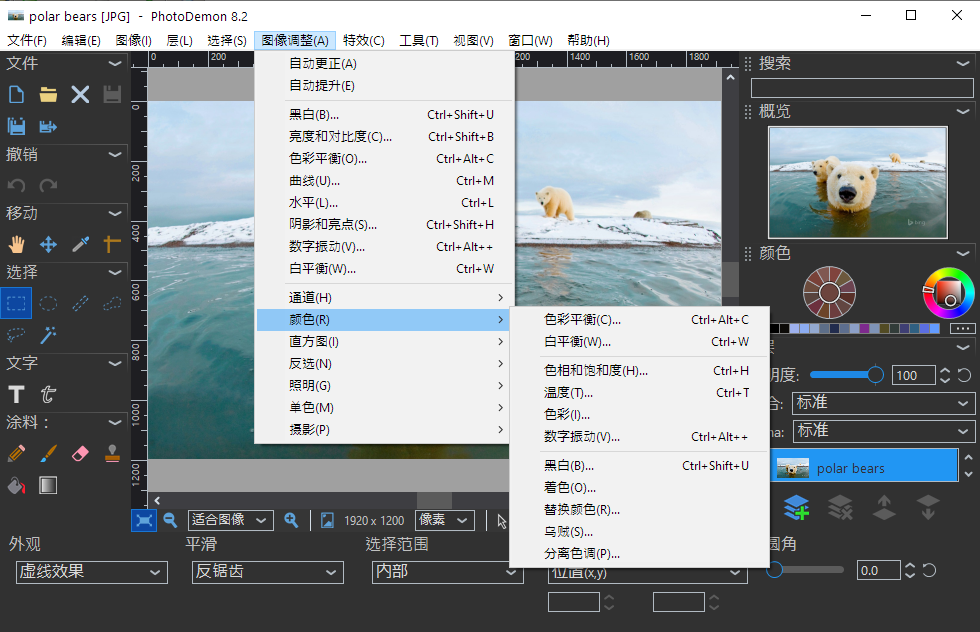
  </li>
  <li>New <a href="https://github.com/tannerhelland/PhotoDemon/commit/5739253c850fbeb86af85f2ba4020da0ce1262d7"><code class="language-plaintext highlighter-rouge">Adjustments &gt; Color &gt; Color lookup</code></a> tool, with built-in support for <a href="https://helpx.adobe.com/photoshop/how-to/edit-photo-color-lookup-adjustment.html">all 3D LUT formats that ship with Photoshop</a> (cube, look, 3dl) and <a href="https://www.nvidia.com/content/GTC/posters/2010/V01-Real-Time-Color-Space-Conversion-for-High-Resolution-Video.pdf">high-performance tetrahedral interpolation</a> for best-in-class quality.</li>
  <li>All photo adjustments (in any combination) can now be exported to <a href="https://github.com/tannerhelland/PhotoDemon/pull/415">standalone 3D LUT files</a>, enabling use of your favorite PhotoDemon adjustments in other software.</li>
  <li>PhotoDemon now ships with <a href="https://github.com/tannerhelland/PhotoDemon/commit/6b769ea70b134fc1190d98f7272aedb6b7dcc510">a default set of public-domain 3D LUTs</a>.</li>
</ul>

<h3 id="file-formats">File formats</h3>

<ul>
  <li>Comprehensive import and export support for <a href="https://en.wikipedia.org/wiki/PaintShop_Pro">Corel Paintshop Pro (psp, pspimage) images</a>, including many text and vector layer features.</li>
  <li>Comprehensive import support for <a href="https://en.wikipedia.org/wiki/GIMP">GIMP XCF images</a>, including full coverage for all color modes, precisions (integer and float), and XCF versions.  GZ-compressed XCF files are also supported.</li>
  <li>Comprehensive import and export support for the brand-new <a href="https://en.wikipedia.org/wiki/AV1#AV1_Image_File_Format_(AVIF)">AVIF file format</a>, c/o the <a href="https://github.com/AOMediaCodec/libavif">open-source libavif library</a>.  AVIF file support is incredibly complex (the stock encoder+decoder apps are almost 3x larger than PhotoDemon!) and they are only available for 64-bit systems, so PhotoDemon does not ship these libraries by default.  If you attempt to open or save an AVIF file, PhotoDemon will offer to download a local copy of libavif.</li>
  <li>Comprehensive import and export support for <a href="https://developers.google.com/speed/webp">animated WebP images</a>, including direct export from PhotoDemon’s built-in screen recording tool (<code class="language-plaintext highlighter-rouge">Tools &gt; Animated screen capture</code>).</li>
</ul>

<p><img src="media/images/animated-screen-capture.png" alt="animated-screen-capture" /></p>

<ul>
  <li>Comprehensive import and export support for <a href="https://qoiformat.org/">lossless QOI (“quite OK image”) files</a>.</li>
  <li>Comprehensive import support for <a href="https://en.wikipedia.org/wiki/Scalable_Vector_Graphics">SVG and SVGZ images</a>, c/o the <a href="https://github.com/RazrFalcon/resvg">open-source resvg library</a></li>
  <li>Comprehensive import support for <a href="https://en.wikipedia.org/wiki/Lossless_JPEG">lossless JPEG (JPEG-LS) images</a>, c/o the <a href="https://github.com/team-charls/charls">open-source CharLS library</a></li>
  <li>Comprehensive import support for <a href="https://en.wikipedia.org/wiki/Comic_book_archive">Comic Book Archive (CBZ) images</a>.</li>
  <li>Comprehensive import support for <a href="https://en.wikipedia.org/wiki/MBM_(file_format)">Symbian (mbm, aif) images</a></li>
  <li>All-new <a href="https://github.com/tannerhelland/PhotoDemon/commit/cfee72e569721a71efe4a5bc8b8858a5f8501517">GIF import and export engines</a>, including a new <a href="https://github.com/tannerhelland/PhotoDemon/commit/aaab70c06a0697b56d0336e22477782b9af59093">best-in-class GIF optimizer</a>.</li>
  <li>New <a href="https://github.com/tannerhelland/PhotoDemon/commit/fc27cfc6a5ce7ab42a7d929e80e220281c818bb6">neural-network color quantizer</a> for maximum-quality results when saving to 256-color image formats, like GIF or web-optimized PNGs.  (The new quantizer is also directly accessible from the <code class="language-plaintext highlighter-rouge">Effects &gt; Stylize &gt; Palettize</code> tool.)</li>
  <li><a href="https://github.com/tannerhelland/PhotoDemon/commit/18a6a152f0923ab0ad737e6f46ea54e6aa28b1b7">Safe overwrite behavior</a> is now the default for all file formats.  (When saving over a file that already exists, PhotoDemon will save to a temporary file, validate the temporary file’s correctness after the save completes, and only <em>then</em> will it replace the old copy with the new one.)</li>
</ul>

<h3 id="image-and-layer-tools">Image and Layer tools</h3>

<ul>
  <li><a href="https://github.com/tannerhelland/PhotoDemon/pull/387">All-new selection tool engine</a>, including full support for merging selections.  All selection tools support new “Add”, “Subtract”, and “Intersect” combine modes.  In addition, a new canvas selection renderer automatically highlights the merged region of composite selections.  (Other new rendering UI features are available on each selection toolpanel).</li>
  <li>New <a href="https://github.com/tannerhelland/PhotoDemon/pull/403"><code class="language-plaintext highlighter-rouge">Edit &gt; Content-aware fill</code> (and corresponding <code class="language-plaintext highlighter-rouge">Select &gt; Heal selected area</code>) tools</a> can intelligently remove objects from photos.  Just select the object you want to remove, then click the menu to remove it!</li>
  <li>Completely redesigned <a href="https://github.com/tannerhelland/PhotoDemon/pull/361"><code class="language-plaintext highlighter-rouge">Image &gt; Resize</code> tool</a>, with real-time interactive previews, 12 different resampling filters, memory size estimations, a user-resizable dialog, progress bar updates, and more.  The new tool was custom-built for PhotoDemon, and it has very low memory requirements, excellent performance, and zero 3rd-party dependencies.  (The <code class="language-plaintext highlighter-rouge">Layer &gt; Resize</code> tool also receives all of these improvements!)</li>
  <li>New <a href="https://github.com/tannerhelland/PhotoDemon/commit/24f50821c1fd665494d72fd4e4e75fc29e8c3a0e"><code class="language-plaintext highlighter-rouge">Layer &gt; Replace</code> tools</a>, for quickly replacing an existing layer with data from the clipboard or any arbitrary image file.</li>
</ul>

<p><img src="media/images/layer_replace.png" alt="layer_replace" /></p>

<ul>
  <li>Overhauled <a href="https://github.com/tannerhelland/PhotoDemon/commit/6bfe841f282ae9ec9d75b4cd29065eee11c7e9f2"><code class="language-plaintext highlighter-rouge">Image &gt; Crop</code> tool</a>, including new support for retaining editable text layers after cropping (instead of rasterizing them).</li>
  <li>The <code class="language-plaintext highlighter-rouge">Advanced text tool</code> provides a new “stretch to fit” option, which automatically sizes the font to fit within the text layer’s current boundaries.</li>
</ul>

<p><img src="media/images/text_stretch_to_fit.png" alt="text_stretch_to_fit" /></p>

<ul>
  <li>New <a href="https://github.com/tannerhelland/PhotoDemon/commit/3b74576eb425c5ff80a4b05615f94a86faabf261">lock aspect ratio</a> toggle on the Move/Size tool</li>
  <li>New <code class="language-plaintext highlighter-rouge">Edit &gt; Stroke</code> and <code class="language-plaintext highlighter-rouge">Edit &gt; Fill</code> tools allow you to easily stroke a selection outline or fill a selected outline with custom pens or brushes.</li>
</ul>

<p><img src="media/images/edit_fill_and_stroke.webp" alt="edit_fill_and_stroke" /></p>

<h3 id="batch-processor">Batch processor</h3>

<ul>
  <li>New support for <a href="https://github.com/tannerhelland/PhotoDemon/commit/4c6e7040440e5f2424485670d04d618a7fe211bd">preserving folder structure</a> when batch processing images from a complex folder tree</li>
  <li>New support for batch processing <a href="https://github.com/tannerhelland/PhotoDemon/commit/647927e3130eaeaac4d58376c5b0f20463fbf57b">animated image formats (GIF, PNG, WebP)</a></li>
</ul>

<p><img src="media/images/batch_process_animation.png" alt="batch_process_animation.png" /></p>

<h3 id="user-interface">User interface</h3>

<ul>
  <li>A <a href="https://github.com/tannerhelland/PhotoDemon/commit/471070d3b01b44261ba2289dc32095a9346990a0">new compact toolpanel design</a> requires less on-screen space, while still providing one-click access to all of PhotoDemon’s advanced tool features.  (This also enables PhotoDemon to successfully work all the way down to 1024x768 screen resolutions - a rare case of supporting even <em>older</em> hardware than previous versions of the app!)</li>
  <li>Adjustment and Effect dialogs are no longer fixed-size - <a href="https://github.com/tannerhelland/PhotoDemon/commit/ab5363a885aec5529a81c28255defe77a516b285">you can freely resize them at run-time</a>, and the preview area will resize accordingly.</li>
</ul>

<p><img src="media/images/resize_windows.webp" alt="resize_windows.webp" /></p>

<ul>
  <li>Adjustment and Effect tools now have <a href="https://github.com/tannerhelland/PhotoDemon/commit/9d7adda0ab158f00d2f0ac393bc19ef800b31b30">built-in Undo/Redo on each dialog</a></li>
  <li><a href="https://github.com/tannerhelland/PhotoDemon/commit/a56af482d262f6dab1ff016f111a0e909d9bfb98">Faster app startup time</a>, particularly on Windows 10 and 11</li>
  <li>PhotoDemon can now <a href="https://github.com/tannerhelland/PhotoDemon/commit/735ba00b2f8da59356fab95c8486cda54b915939">automatically restore your previous session</a> if a system reboot interrupts.</li>
</ul>

<p><img src="media/images/session_restore.png" alt="session restore" /></p>

<ul>
  <li><a href="https://github.com/tannerhelland/PhotoDemon/commit/e91936f0a900f2ed5b8513bf046bdfedb0ff0897">Improved localization tools</a>, including <a href="https://github.com/tannerhelland/PhotoDemon/commit/f0b26251d397de5263ee065d423bbd3989b77629">automated matching against other open-source translations</a>, provide a significantly improved experience for non-EN-US locales.</li>
</ul>

<p><img src="media/images/language_editor.png" alt="language editor" /></p>

<ul>
  <li><a href="https://github.com/tannerhelland/PhotoDemon/commit/84f84be77b7a1f52cb1151eeef8e5df1bbec5fad">Improved clipboard support</a> when copy/pasting to/from Google Chrome</li>
  <li>New <a href="https://github.com/tannerhelland/PhotoDemon/commit/dbac890b93ec10b36fd2e63aecf96d5e92904c6f">background image compressor</a> greatly reduces memory usage when working with multiple images at once</li>
  <li>Similarly, a new <a href="https://github.com/tannerhelland/PhotoDemon/commit/f00f0a81bf9f8fbff0a2c125b774884111de82e3">run-time resource minimizer</a> for UI elements makes PhotoDemon - already among the lightest photo editors - even lighter on system resources.</li>
  <li>PhotoDemon’s <code class="language-plaintext highlighter-rouge">Window</code> menu now displays a <a href="https://github.com/tannerhelland/PhotoDemon/commit/009721ddc60246c803ee32ffe4c4376937a09bb4">list of open images</a> for immediate access to any open image (even if you’ve disabled the image tabstrip).</li>
  <li><a href="https://github.com/tannerhelland/PhotoDemon/commit/a421afaaddfee746e1769768503f300cf4849616">Expanded “convenience” buttons in the Layer Toolbox</a>, including new Shift+Click behavior (see button tooltips)</li>
  <li><a href="https://github.com/tannerhelland/PhotoDemon/commit/08b2ad83e2e1fc89e2aa69f219a1da9d036098ce">Additional hotkeys have been implemented</a> to better match other photo editing software</li>
  <li><a href="https://github.com/tannerhelland/PhotoDemon/commit/e2c17eaeda95abb2e27fd9bc036a6cf5047a184b">Recent image and macro files</a> will now appear in search results from PhotoDemon’s built-in search tool (Ctrl+F)</li>
</ul>

<h3 id="other">Other</h3>

<p>For a full list of changes, <a href="https://github.com/tannerhelland/PhotoDemon/commits/main">visit the project’s commit log</a>.</p>

<h2 id="stable-release">Stable release</h2>

<p>As with past releases, I’d like to allow several weeks for public beta testing.  If no severe issues are encountered, the formal 9.0 release should happen in <strong>September 2022</strong>.</p>

<p>If you encounter bugs or want to provide other feedback, please <a href="https://github.com/tannerhelland/PhotoDemon/issues">create a new issue on GitHub</a>.  Otherwise, I’ll see you in a few weeks with the official 9.0 release announcement!</p>

<h2 id="in-conclusion">In conclusion</h2>

<p>Thank you for using PhotoDemon.</p>

<p>I am deeply grateful to everyone who contributed to this release, whether through Patreon, GitHub, or by sending old-fashioned emails.  A full list of contributors is available on <a href="contributors/">the Contributors page</a>, or in the <code class="language-plaintext highlighter-rouge">Help &gt; About</code> menu of PhotoDemon itself.</p>

<p>Look for a final 9.0 release in the coming weeks, and best wishes for a happy and healthy rest of 2022.</p>]]></content><author><name>Tanner Helland</name><email>tannerhelland@gmail.com</email></author><summary type="html"><![CDATA[After two years of work, a new PhotoDemon release is almost ready. New features include an improved user interface, multi-selection support, full support for new image formats (AVIF, PSP, SVG, XCF and more), content-aware fill, new filters and effects, and much more.]]></summary></entry><entry><title type="html">PhotoDemon Year In Review: 2021</title><link href="https://photodemon.org/2022/02/23/photodemon-2021-year-in-review.html" rel="alternate" type="text/html" title="PhotoDemon Year In Review: 2021" /><published>2022-02-23T13:23:19+00:00</published><updated>2022-02-23T13:23:19+00:00</updated><id>https://photodemon.org/2022/02/23/photodemon-2021-year-in-review</id><content type="html" xml:base="https://photodemon.org/2022/02/23/photodemon-2021-year-in-review.html"><![CDATA[<p>Hello, friends.  You haven’t heard much from me during the past year, but that’s only because I was hard at work on the next version of PhotoDemon!</p>

<p>I thought it might be fun to share all the new features that arrived in PhotoDemon during 2021.  You may have seen some of these improvements if you <a href="https://github.com/tannerhelland/PhotoDemon/commits/main">follow PhotoDemon’s development over at GitHub</a>, but if not, you’re in for a treat.</p>

<p>As always, you can play with these new features today by <a href="download/#nightly">downloading the latest PhotoDemon nightly build</a>.  Otherwise, these features will be available in a 9.0 stable release sometime later this year.</p>

<h2 id="major-new-features-that-arrived-in-2021">Major new features that arrived in 2021</h2>

<h3 id="new-toolpanel-design">New toolpanel design</h3>

<p><img src="media/images/interface_8.4.png" alt="screen capture old version" /></p>

<p><img src="media/images/interface_9.0.png" alt="screen capture new version" /></p>

<p>PhotoDemon’s new <a href="https://github.com/tannerhelland/PhotoDemon/commit/471070d3b01b44261ba2289dc32095a9346990a0">top-aligned toolpanel UX</a> takes up 50% less screen space, while still providing one-click access to all advanced tool features.  Options are grouped into logical categories, with the most common settings accessible directly from the toolpanel.</p>

<p>Advanced options can be accessed from category-specific drop-down panels - just click on a category titlebar to “drop” its corresponding panel, or use the tab key to navigate through each setting using only the keyboard.</p>

<p><img src="media/images/new_toolpanels.webp" alt="new toolpanels" /></p>

<p>Panels automatically hide when you switch away from them, or you can use the “pin” button in a panel’s lower corner to “pin” it open.  On larger displays, the new toolpanel engine can even slide some options out of panels and directly into the toolpanel (if enough horizontal space is available).</p>

<p>My goal with this new design was three-fold:</p>
<ol>
  <li>Giving your images even more space on-screen.</li>
  <li>Making it easier for users of other popular photo editors to acclimate to PhotoDemon.</li>
  <li>Keeping the interface highly readable and “discoverable”, especially for beginners.</li>
</ol>

<p>I hope you enjoy the new toolpanel design.  Please let me know if you have any ideas for improving it further.</p>

<h3 id="new-selection-tool-features-including-combined-selections">New selection tool features, including combined selections</h3>

<p><img src="media/images/combine_selections.webp" alt="screen-capture" /></p>

<p>This feature took me most of 2021 (and a bit of 2022) to implement, but yes - PhotoDemon now supports multiple selections.  You can combine selections of any shape using “add”, “subtract”, and “intersect” combine modes.  (And of course, the old “replace” mode is still available!)</p>

<p>The new “combine selections” feature works across all selection tools, and PhotoDemon’s version is especially cool because you can <em>still edit your current selection</em> even <em>after</em> a merge!  (You can see this in the animation above - watch as the “lasso” selection moves around, and the merged selection updates in real-time.)</p>

<p>This brings incredible flexibility because unlike other photo editors, you don’t lose the ability to modify a selection once it is merged.  PhotoDemon allows you to move, resize, and transform that last selection over and over to get it “just right”.</p>

<p>The new selection engine also provides new rendering features.  The new renderer will automatically highlight the interior region formed when merging selections, which is very helpful with the “subtract” and “intersect” combine modes, especially when the underlying selections are complex.  You can also choose to fade-out the area outside the selection, or disable outline animations completely.  (These settings are accessible from the new “appearance” panel on all selection tools.)</p>

<h3 id="new-image-format-support">New image format support</h3>

<p>I may have gone a little overboard with new image format support in this release, but I can’t help it - I love it when PhotoDemon helps a user “unlock” images stuck in proprietary or poorly supported formats.</p>

<p>That’s why I am incredibly excited to announce that PhotoDemon 9.0 will ship with support for a very popular (and very complex) image format: Paintshop Pro (PSP) images.  PhotoDemon’s Paintshop Pro engine is 100% custom-built, and it provides native support for many advanced Paintshop Pro features, including both vector layers and editable text!</p>

<p>For example, here is a screenshot from <a href="https://github.com/tannerhelland/PhotoDemon/discussions/347">the PhotoDemon forums</a> showing an image with hundreds of vector layers as it appears in Paintshop Pro…</p>

<p><img src="https://user-images.githubusercontent.com/142650/103448820-bd51eb80-4c96-11eb-9bef-30a70de1e504.png" alt="screen-capture" /></p>

<p>…and here is the same image, loaded into PhotoDemon:</p>

<p><img src="https://user-images.githubusercontent.com/1930029/104645217-05e0b000-566c-11eb-9e2a-a6fa978b8a6c.png" alt="screen-capture" /></p>

<p>Here is an additional debug screenshot marking all the vector objects (e.g. shapes defined purely by mathematical formulas) in the image:</p>

<p><img src="https://user-images.githubusercontent.com/1930029/104645954-0b8ac580-566d-11eb-9fa5-5b858d91ffd9.png" alt="screen-capture" /></p>

<p>PhotoDemon has to solve all of these vector equations on-the-fly and attempt to render them the same as Paintshop Pro.  The results look pretty darn close, and PhotoDemon will do all that while loading the file 3-4x faster than the latest version of Paintshop Pro!</p>

<p>Besides Paintshop Pro images, nightly builds also add support for the following image formats:</p>

<ul>
  <li>Import and export support for the brand-new <a href="https://en.wikipedia.org/wiki/AV1#AV1_Image_File_Format_(AVIF)">AVIF file format</a>, c/o the <a href="https://github.com/AOMediaCodec/libavif">open-source libavif library</a>.  AVIF file support is incredibly complex (the stock encoder+decoder apps are almost 3x larger than PhotoDemon!) and they are only available for 64-bit systems, so PhotoDemon does not ship these libraries by default.  If you attempt to open or save an AVIF file, PhotoDemon will offer to download a local copy of libavif for you.</li>
  <li>Comprehensive import and export support for <a href="https://developers.google.com/speed/webp">animated WebP images</a>, including direct export to animated WebP from PhotoDemon’s screen recorder tool (<code class="language-plaintext highlighter-rouge">Tools &gt; Animated screen capture</code>).  All of the animations on this page were generated using this feature!</li>
  <li>All-new <a href="https://github.com/tannerhelland/PhotoDemon/commit/cfee72e569721a71efe4a5bc8b8858a5f8501517">GIF import and export engines</a>, including a new <a href="https://github.com/tannerhelland/PhotoDemon/commit/aaab70c06a0697b56d0336e22477782b9af59093">best-in-class animated GIF optimizer</a>.</li>
  <li>Import support for <a href="https://en.wikipedia.org/wiki/Lossless_JPEG">lossless JPEG (JPEG-LS) images</a>, c/o the <a href="https://github.com/team-charls/charls">CharLS library</a></li>
  <li>Import support for <a href="https://en.wikipedia.org/wiki/Comic_book_archive">Comic Book Archive (CBZ) images</a>.</li>
  <li>Import support for old <a href="https://en.wikipedia.org/wiki/MBM_(file_format)">Symbian (mbm, aif) images</a></li>
</ul>

<h3 id="new-best-in-class-image--resize-tool">New best-in-class Image &gt; Resize tool</h3>

<p>The <code class="language-plaintext highlighter-rouge">Image &gt; Resize</code> tool might be the tool I use most often.  I’ve really tried to make PhotoDemon’s implementation a great one, but Photoshop’s version has an additional feature that makes me extremely jealous: live previews right there in the Resize tool window.</p>

<p>Why?  There are many different algorithms for resizing pixel data, with all sorts of trade-offs depending on an image’s size and contents.  Unfortunately, there’s no “always the best choice” algorithm, so when quality is paramount, some trial-and-error is necessary to figure out which algorithm will work best.</p>

<p>And anything involving trial-and-error benefits greatly from live previews.</p>

<p>So why don’t more photo editors provide live previews for this ubiquitous tool?  Well, because it’s horrifically complicated to generate a real-time preview that accurately reflects a “full” resize.  (Preview windows typically take shortcuts to produce a preview as quickly as possible, but resizing algorithms need to examine huge numbers of pixels, which makes reliable previews a daunting task.)</p>

<p>Against my better judgment, <a href="https://github.com/tannerhelland/PhotoDemon/pull/361">I’ve finally tackled a similar feature in PhotoDemon</a>.  I’m proud to say that PhotoDemon will be (to my knowledge) the first open-source photo editor to provide live image resize previews, and it offers this for not one, or two, but <strong>twelve</strong> different resize strategies.  (Thirteen, I suppose, if you include the “automatic” option that attempts to choose a good algorithm for you.)</p>

<p><img src="media/images/image_resize_new.png" alt="screen-capture" /></p>

<p>Supported interpolation models include nearest-neighbor, bilinear, cosine, Hermite, bell, quadratic, b-spline, bicubic, Catmull-Rom, Mitchell-Netravali, cubic convolution and variable-radius Lanczos (sinc) filtering.  All algorithms are provided in two forms: speed-optimized integer-only calculations, and slower but theoretically “perfect” floating-point versions.  You can toggle between these via the new “optimize for speed” toggle.</p>

<p>The new resize engine has very low memory requirements and excellent performance, and it also brings new niceties like memory-size estimation, a user-resizable dialog, and progress bar updates after you hit OK.  (And as an added bonus, the <code class="language-plaintext highlighter-rouge">Layer &gt; Resize</code> tool gains all of these same benefits!)</p>

<h3 id="support-for-photoshop-effect-plugins-8bf">Support for Photoshop effect plugins (8bf)</h3>

<p>PhotoDemon now attempts to support <a href="https://en.wikipedia.org/wiki/Photoshop_plugin">Photoshop effect plugins</a> (“8bf”, 32-bit only).  This feature is made possible thanks to <a href="https://github.com/spetric/Photoshop-Plugin-Host">spetric’s Photoshop-Plugin-Host library</a>.</p>

<p>This is an area where I lack expertise, but I’ve tested it against filters that ship with old versions of Photoshop, and the results are encouraging.  For example, here is Photoshop 5.0’s “Texturize” filter running natively within PhotoDemon:</p>

<p><img src="media/images/8bf_filter.png" alt="screen-capture" /></p>

<p>Unfortunately, Photoshop plugins vary widely in quality and reliability, so you may encounter plugins that misbehave or fail to load at all.  If you do, please <a href="https://github.com/tannerhelland/PhotoDemon/issues/new/choose">create an issue on GitHub</a> so I can investigate.</p>

<h3 id="new-and-improved-effects">New and Improved Effects</h3>

<ul>
  <li>A new <a href="https://github.com/tannerhelland/PhotoDemon/commit/fc27cfc6a5ce7ab42a7d929e80e220281c818bb6">neural-network color quantizer</a> provides extremely high-quality results when saving to 256-color image formats, like GIF or web-optimized PNGs.  The new quantizer is also directly accessible as an effect via the <code class="language-plaintext highlighter-rouge">Effects &gt; Stylize &gt; Palettize</code> menu.</li>
  <li>A new <a href="https://github.com/tannerhelland/PhotoDemon/pull/364"><code class="language-plaintext highlighter-rouge">Effects &gt; Distort &gt; Droste</code></a> tool helps you channel your inner <a href="https://en.wikipedia.org/wiki/Print_Gallery_(M._C._Escher)">M.C. Escher</a>.  (Thank you to the author(s) of <a href="https://forums.getpaint.net/topic/32240-droste-v11-may-8-2019/">the Paint.NET Droste plugin</a> that inspired it.)  This effect takes an image like this…</li>
</ul>

<p><img src="media/images/clock.png" alt="clock" /></p>

<p>…and produces a result like this:</p>

<p><img src="media/images/clock_droste.png" alt="clock" /></p>

<ul>
  <li>A new <a href="https://github.com/tannerhelland/PhotoDemon/pull/358"><code class="language-plaintext highlighter-rouge">Effects &gt; Render &gt; Truchet Tiles</code></a> tool can automatically produce a variety of geometric patterns for you:</li>
</ul>

<p><img src="media/images/truchet.png" alt="Truchet tiles" /></p>

<ul>
  <li>A new <code class="language-plaintext highlighter-rouge">Effects &gt; Animation</code> menu adds support for <a href="https://github.com/tannerhelland/PhotoDemon/commit/06a4f1df3a5231eb0cac17dd7f426a049e44f7e7">Foreground and Background effects</a>, so you can easily add a new background or foreground layer to your favorite animated images</li>
  <li>A new <a href="https://github.com/tannerhelland/PhotoDemon/commit/f7e28487c087f1483dac435290ab3c30f7c18ac0"><code class="language-plaintext highlighter-rouge">Effects &gt; Edge &gt; Gradient flow</code></a> tool analyzes directionality in an image, which is useful in scientific analysis… or, you know, for making weird images like this:</li>
</ul>

<p><img src="media/images/gradient_flow.png" alt="clock" /></p>

<ul>
  <li>Greatly improved and accelerated <a href="https://github.com/tannerhelland/PhotoDemon/commit/02f60a5c6807cec763fcfb7628332b9b6de897f2"><code class="language-plaintext highlighter-rouge">Effects &gt; Artistic &gt; Stained Glass</code></a> and <a href="https://github.com/tannerhelland/PhotoDemon/commit/ac2772d145a30b5e1a4bccd334c642062f63708c"><code class="language-plaintext highlighter-rouge">Effects &gt; Pixelate &gt; Crystallize</code></a> tools, including new pattern features:</li>
</ul>

<p><img src="media/images/stained_glass_new.png" alt="clock" /></p>

<h3 id="new-and-improved-adjustments">New and Improved Adjustments</h3>

<ul>
  <li>New <a href="https://github.com/tannerhelland/PhotoDemon/commit/5739253c850fbeb86af85f2ba4020da0ce1262d7"><code class="language-plaintext highlighter-rouge">Adjustments &gt; Color &gt; Color lookup</code></a> tool, with built-in support for <a href="https://helpx.adobe.com/photoshop/how-to/edit-photo-color-lookup-adjustment.html">all 3D LUT formats that ship with Photoshop</a> (cube, look, 3dl) and <a href="https://www.nvidia.com/content/GTC/posters/2010/V01-Real-Time-Color-Space-Conversion-for-High-Resolution-Video.pdf">high-performance tetrahedral interpolation</a> for best-in-class quality</li>
  <li>New <a href="https://github.com/tannerhelland/PhotoDemon/commit/dde19d0c6e45b41f9c0d88d6d7c62a4651595836"><code class="language-plaintext highlighter-rouge">Adjustments &gt; Lighting &gt; Dehaze</code></a> tool, for recovering images marred by haze or fog</li>
  <li>Overhauled <a href="https://github.com/tannerhelland/PhotoDemon/commit/989f861d8cf4b32e5a49c10cc87c094cc7f38b33"><code class="language-plaintext highlighter-rouge">Adjustments &gt; Curves</code></a> tool, with improved performance and a new UI</li>
  <li>Completely redesigned <a href="https://github.com/tannerhelland/PhotoDemon/commit/f142633977c1eed9f627f6ab6ab84053960914a1"><code class="language-plaintext highlighter-rouge">Adjustments &gt; Color &gt; Photo filter</code></a> tool, to better match the equivalent feature in Photoshop</li>
  <li><a href="https://en.wikipedia.org/wiki/Otsu%27s_method">Otsu’s method</a> is now used by <a href="https://github.com/tannerhelland/PhotoDemon/commit/4286395b520ec84b4c047eb37092a91532e7d500">the <code class="language-plaintext highlighter-rouge">Adjustments &gt; Monochrome</code> tool</a>, for improved contrast when reducing an image to two colors.</li>
</ul>

<h3 id="image-and-layer-tools">Image and Layer tools</h3>

<ul>
  <li>New <a href="https://github.com/tannerhelland/PhotoDemon/commit/24f50821c1fd665494d72fd4e4e75fc29e8c3a0e"><code class="language-plaintext highlighter-rouge">Layer &gt; Replace</code> tools</a>, for quickly replacing an existing layer with data from the clipboard or an arbitrary image file.</li>
  <li>Overhauled <a href="https://github.com/tannerhelland/PhotoDemon/commit/6bfe841f282ae9ec9d75b4cd29065eee11c7e9f2"><code class="language-plaintext highlighter-rouge">Image &gt; Crop</code> tool</a>, with new support for preserving editable text layers after a crop (instead of rasterizing them).</li>
  <li>New <a href="https://github.com/tannerhelland/PhotoDemon/commit/3b74576eb425c5ff80a4b05615f94a86faabf261">lock aspect ratio</a> toggles on the <code class="language-plaintext highlighter-rouge">Move/Size</code> tool</li>
</ul>

<h3 id="batch-processor">Batch processor</h3>

<ul>
  <li>New support for <a href="https://github.com/tannerhelland/PhotoDemon/commit/4c6e7040440e5f2424485670d04d618a7fe211bd">preserving folder structure</a> when batch processing images from complex folder trees</li>
  <li>New support for batch processing <a href="https://github.com/tannerhelland/PhotoDemon/commit/647927e3130eaeaac4d58376c5b0f20463fbf57b">animated image formats (GIF, PNG, WebP)</a></li>
</ul>

<h3 id="user-interface">User interface</h3>

<ul>
  <li>Adjustment and Effect dialogs are no longer fixed-size - <a href="https://github.com/tannerhelland/PhotoDemon/commit/ab5363a885aec5529a81c28255defe77a516b285">you can resize all of them at run-time</a>!</li>
  <li>Adjustment and Effect tools now have <a href="https://github.com/tannerhelland/PhotoDemon/commit/9d7adda0ab158f00d2f0ac393bc19ef800b31b30">built-in Undo/Redo on each dialog</a></li>
  <li><a href="https://github.com/tannerhelland/PhotoDemon/commit/a56af482d262f6dab1ff016f111a0e909d9bfb98">Faster app startup time</a>, particularly on Windows 10 and 11.</li>
  <li>PhotoDemon can now <a href="https://github.com/tannerhelland/PhotoDemon/commit/735ba00b2f8da59356fab95c8486cda54b915939">automatically restore a previous session</a> when a system reboot interrupts.</li>
  <li><a href="https://github.com/tannerhelland/PhotoDemon/commit/84f84be77b7a1f52cb1151eeef8e5df1bbec5fad">Improved clipboard support</a> when copy/pasting to/from Google Chrome.</li>
  <li>New <a href="https://github.com/tannerhelland/PhotoDemon/commit/dbac890b93ec10b36fd2e63aecf96d5e92904c6f">background image compressor</a> greatly reduces memory usage when working with multiple images.</li>
  <li>Similarly, a new <a href="https://github.com/tannerhelland/PhotoDemon/commit/f00f0a81bf9f8fbff0a2c125b774884111de82e3">run-time resource minimizer</a> specifically designed for UI elements makes PhotoDemon - already among the lightest photo editors - even lighter on system resources.</li>
  <li>The <code class="language-plaintext highlighter-rouge">Window</code> menu now displays a <a href="https://github.com/tannerhelland/PhotoDemon/commit/009721ddc60246c803ee32ffe4c4376937a09bb4">list of open images</a> for immediate access to any open image (even if you’ve disabled the image tabstrip).</li>
  <li><a href="https://github.com/tannerhelland/PhotoDemon/commit/a421afaaddfee746e1769768503f300cf4849616">Expanded “convenience” buttons in the Layer Toolbox</a>, including new Shift+Click behavior (see button tooltips)</li>
</ul>

<p><img src="media/images/improved_layer_buttons.png" alt="clock" /></p>

<ul>
  <li><a href="https://github.com/tannerhelland/PhotoDemon/commit/08b2ad83e2e1fc89e2aa69f219a1da9d036098ce">Additional hotkeys have been implemented</a> to better match other photo editing software</li>
  <li><a href="https://github.com/tannerhelland/PhotoDemon/commit/e2c17eaeda95abb2e27fd9bc036a6cf5047a184b">Recent image and macro files</a> will now appear in search results from PhotoDemon’s built-in search tool (Ctrl+F)</li>
</ul>

<h3 id="thats-still-not-everything-but-im-getting-tired">That’s still not everything, but I’m getting tired…</h3>

<p>For a full list of changes, including many more minor improvements and bug-fixes, <a href="https://github.com/tannerhelland/PhotoDemon/commits/main">visit the project’s commit log at GitHub</a>.</p>

<h2 id="special-thanks">Special thanks</h2>

<p>Thank you to everyone who reported issues and shared feedback over the past year.  I am indebted to all of you.  ❤</p>

<p>And of course, an <strong>extra-large thank you</strong> to <a href="https://www.patreon.com/photodemon">all of PhotoDemon’s Patreon supporters</a> and <a href="contributors/">other contributors</a>, whose donations make this project possible.  If you find PhotoDemon useful, please consider <a href="https://www.patreon.com/photodemon">joining the Patreon campaign</a> or <a href="donate/">making a one-time donation</a>.  Every little bit helps.</p>

<h2 id="when-will-photodemon-90-release">When will PhotoDemon 9.0 release?</h2>

<p>I honestly don’t know.  Sometime in 2022?  Probably?  Hopefully?!</p>

<p>I’m about 2/3 of the way through my todo list for the 9.0 release, which would hypothetically put its release date sometime near autumn.  That said, I may get anxious and push out a 9.0 release sooner, and save some todo list items for a future 10.0 release… or I might get overly ambitious and add a few more things to the todo list, which would push 9.0’s release back but make it even better.</p>

<p>What are your feelings?  Do you prefer giant releases with tons of new features?  Or smaller, more regular releases?</p>

<p>Or, do you happily use PhotoDemon’s nightly builds and get every new feature as soon as it’s available?</p>

<p>If you feel strongly one way or another, please <strong><a href="https://github.com/tannerhelland/PhotoDemon/discussions">share your feelings at the PhotoDemon forums</a></strong>.  I’d love to hear your feedback on all the new features coming to version 9.0.</p>

<p>Finally, let me plug <strong><a href="https://www.patreon.com/photodemon">PhotoDemon’s Patreon campaign</a></strong> one more time.  Donations from generous users are the reason I can give away this software for free.  Patreon is a great way to help that happen.</p>

<p>If Patreon isn’t a good fit for you, <strong><a href="donate/">one-time donations</a></strong> are also a tremendous help.  Thank you so much for your generosity.</p>

<p>As for me, it’s time to get back to work on version 9.0.  I hope you’ll get to experience it soon!</p>]]></content><author><name>Tanner Helland</name><email>tannerhelland@gmail.com</email></author><summary type="html"><![CDATA[2021 was an exciting year for PhotoDemon. Here's a list of all the new features and improvements that made their way into nightly builds over the past year...]]></summary></entry><entry><title type="html">PhotoDemon forum is now live</title><link href="https://photodemon.org/2021/02/07/photodemon-forum-now-live.html" rel="alternate" type="text/html" title="PhotoDemon forum is now live" /><published>2021-02-07T10:30:00+00:00</published><updated>2021-02-07T10:30:00+00:00</updated><id>https://photodemon.org/2021/02/07/photodemon-forum-now-live</id><content type="html" xml:base="https://photodemon.org/2021/02/07/photodemon-forum-now-live.html"><![CDATA[<p>Over the years, many users have asked for a public forum (or discussion board) where they can ask questions, share feedback, and get help from other users.  I’m happy to announce that those requests have not been ignored: <a href="https://github.com/tannerhelland/PhotoDemon/discussions">an official PhotoDemon Forum is now available</a>.</p>

<p>PhotoDemon’s new forum is hosted by GitHub, the same developer site that hosts <a href="https://github.com/apple">Apple</a>, <a href="https://github.com/google/">Google</a>, and <a href="https://github.com/microsoft/">Microsoft’s</a> open-source efforts (among thousands of others).  You will need <a href="https://github.com/join">a free GitHub account</a> to participate.  A GitHub account allows you to participate <em>anywhere</em> on GitHub, including the open-source projects of the aforementioned companies.</p>

<p>As you can imagine from the pedigree of the companies involved, GitHub’s account security is best-in-class.  They provide a much safer, faster, and feature-rich discussion board template than I could develop on my own, and I’m grateful that they recently made their forum software available to open-source developers like me.  (The less time I have to spend on things like forum development, the more time I have available for PhotoDemon!)</p>

<p>If you have any feedback on how to improve PhotoDemon or its new public forum… <a href="https://github.com/tannerhelland/PhotoDemon/discussions">share it at the forum, of course</a>!</p>

<p>See you there!</p>]]></content><author><name>Tanner Helland</name><email>tannerhelland@gmail.com</email></author><summary type="html"><![CDATA[PhotoDemon now has a new public forum! The new forum is hosted by GitHub (the same site that hosts PhotoDemon's source code), and anyone can participate. You can reach the new forum by clicking the "Forum" link at the top of this page.]]></summary></entry><entry><title type="html">PhotoDemon 8.4 is now available</title><link href="https://photodemon.org/2020/09/22/photodemon-8-4.html" rel="alternate" type="text/html" title="PhotoDemon 8.4 is now available" /><published>2020-09-22T12:00:00+00:00</published><updated>2020-09-22T12:00:00+00:00</updated><id>https://photodemon.org/2020/09/22/photodemon-8-4</id><content type="html" xml:base="https://photodemon.org/2020/09/22/photodemon-8-4.html"><![CDATA[<h2 id="overview">Overview</h2>

<p>PhotoDemon 8.0 was a massive release, comprising more than 2.5 years of work.  Despite all that effort, some bugs and usability issues slipped through the cracks.</p>

<p>Two weeks ago, the follow-up 8.2 release fixed many issues.  Today’s 8.4 release brings additional fixes and QoL (quality of life) improvements, including a new startup experience that makes it even faster to start editing with PhotoDemon.</p>

<h2 id="download-the-new-release">Download the new release</h2>

<p>If you already have a copy of PhotoDemon, you’re good to go!  The program will automatically update according to your preference in the <strong>Tools &gt; Options &gt; Updates</strong> menu.</p>

<p>If you want to manually download a fresh copy, <a href="https://github.com/tannerhelland/PhotoDemon/releases/download/v8.4/PhotoDemon-8.4.zip"><strong>click here</strong></a> or <strong><a href="download/">visit the download page</a></strong>.</p>

<h2 id="special-thanks">Special thanks</h2>

<p>Thank you to everyone who reported issues and shared feedback over the past month.  I am indebted to all of you.  ❤</p>

<p>And of course, an <strong>extra-large thank you</strong> to <a href="https://www.patreon.com/photodemon">all of PhotoDemon’s Patreon supporters</a> and <a href="contributors/">other contributors</a>, whose donations make this project possible.  If you find PhotoDemon useful, consider <a href="https://www.patreon.com/photodemon">joining our Patreon campaign</a> or <a href="donate/">making a one-time donation</a>.  Every little bit helps.</p>

<h2 id="whats-new-and-improved-in-84">What’s new and improved in 8.4</h2>

<h4 id="a-new-start-up-experience">A new start-up experience</h4>

<p>One of PhotoDemon’s main goals is to never waste your time.  This begins with extremely fast startup time, but I recently realized that a fast app start is only <em>part</em> of the equation.  You also need to be able to jump right into editing photos.</p>

<p>To that end, PhotoDemon now provides an improved startup screen:</p>

<p><img src="media/images/photodemon_8.4_start_screen.png" alt="screen-capture" /></p>

<p>On the left side of the canvas, a set of four buttons provide quick ways to load images into the app.</p>

<p>On the right, a dynamic column of recently opened images lets you jump into editing anything you’ve recently been working on.</p>

<p>For users worried about privacy, options are provided right there on the page to either erase the recent images list, or prevent it from displaying at all.</p>

<p>Of course, you can still drag+drop images onto the canvas area to load them into the app, or you can ignore this start screen entirely and keep using the left toolbar or main menu to load your images.  Whichever method you prefer, I hope this update wastes a little less of your time.</p>

<h4 id="new-dust-and-scratches-tool">New Dust and Scratches tool</h4>

<p>I don’t usually add new tools to stability updates like this… but this time, I couldn’t resist!</p>

<p>I recently read an article by <a href="https://www.cnblogs.com/Imageshop/p/11087804.html">the author of a Chinese-language photo editor</a>, where he tested a bunch of different filters to try and reproduce Photoshop’s “Dust and Scratches” noise removal tool.  It turns out that Photoshop’s tool is just a modification of a standard Median filter, and since PhotoDemon already provides a high-performance Median filter, it was trivial to put together a new Dust and Scratches tool that behaves more-or-less identically to Photoshop’s.</p>

<p><img src="media/images/dust_and_scratches.png" alt="screen-capture" /></p>

<p>The new “Dust and scratches” tool is available from the <code class="language-plaintext highlighter-rouge">Effects &gt; Noise &gt; Dust and scratches</code> menu.</p>

<h4 id="middle-mouse-button-provides-constant-access-to-the-hand-panmove-tool">Middle mouse button provides constant access to the Hand (pan/move) tool</h4>

<p>Some photo editors (GIMP, Paint.NET) allow you to use the middle mouse button to click-drag around the current image.  This works regardless of which tool you are using, so even if you’re using the paintbrush tool, you can press-and-hold the middle mouse button to temporarily activate the hand tool.</p>

<p>PhotoDemon now supports this behavior as well.</p>

<h4 id="new-interface-preferences-for-a-more-personalized-experience">New interface preferences for a more personalized experience</h4>

<p>PhotoDemon has always defaulted to neutral gray for its canvas background.  In 8.4, you can now change this behavior from the <code class="language-plaintext highlighter-rouge">Tools &gt; Options &gt; Interface</code> panel.</p>

<p><img src="media/images/new_interface_options.png" alt="screen-capture" /></p>

<p>This preference applies regardless of your current UI theme settings.  If you want a dark UI theme with a hot pink canvas background, no one will stop you!</p>

<p>I’ve also reworked the transparency grid options on the interface page, with a live preview of your current settings and new color presets for the grid, which mirrors similar options in Photoshop.</p>

<h4 id="new-single-session-preference">New single-session preference</h4>

<p>Some users like to associate certain file types with PhotoDemon.  This allows you to click on e.g. any JPEG photo, and Windows will automatically use PhotoDemon to display it.</p>

<p>In previous versions of PhotoDemon, loading images this way would always spawn a new copy of the program, which could lead to a bunch of parallel PhotoDemon instances in the task bar.  I have now added a new preference for “single-instance” behavior, where any images loaded from external sources (like Windows Explorer) will instead share the same app window.</p>

<p><img src="media/images/single_session.png" alt="screen-capture" /></p>

<p>Note that unlike many photo editors, this behavior is optional.  You can leave this new preference off to run as many parallel PhotoDemon instances as you want.</p>

<h4 id="improved-stability-when-working-with-png-files">Improved stability when working with PNG files</h4>

<p>PhotoDemon 8.0 shipped with an all-new PNG engine.  (PNG is a popular image file format; for example, all screenshots on this page are PNG files.)  The new engine loads and saves PNG files significantly faster than previous versions, color-management is integrated into every aspect of its pipeline, and it uses modern optimization strategies to produce even smaller PNG files when saving.  The new engine also supports animated PNG files, which are a critical component of PhotoDemon’s new animated screen capture tool (found in the <code class="language-plaintext highlighter-rouge">Tools &gt; Animated Screen Capture (APNG)</code> menu).</p>

<p>In the 8.2 update, I tweaked the engine to improve some animated PNG features… and unfortunately, I did not test my changes very well, because I accidentally broke some normal PNG behavior.  I am so sorry!</p>

<p>In today’s release, I have revisited those decisions and gotten everything back to working order.  I apologize for any instability you may have experienced with PNG files over the past two weeks.</p>

<h4 id="many-other-minor-bug-fixes">Many other minor bug-fixes</h4>

<p>I won’t bore you with the details, but many other little annoyances and issues have also been fixed.  Thank you again to everyone who submits bug-reports and feedback - your help is invaluable.</p>

<h2 id="in-conclusion">In conclusion</h2>

<p>I know I said this with the 8.2 release two weeks ago… but this time, I <em>really</em> think it’s time to start work on PhotoDemon 9.0.</p>

<p>As usual, I’ve got my own roadmap of new features and improvements to work on, but I also want to hear from you!  What would you like to see in PhotoDemon 9.0?</p>

<p><strong><a href="about/">My contact information is available here</a></strong>.  I’d love to hear your suggestions.</p>

<p>Finally, let me plug <strong><a href="https://www.patreon.com/photodemon">PhotoDemon’s Patreon campaign</a></strong> one more time.  Donations from generous users are the reason I can give away this software for free.  Patreon is a great way to help that happen, and as a bonus, you’ll also get access to insider updates on PhotoDemon 9.0 as it progresses.</p>

<p>If Patreon isn’t a good fit for you, <strong><a href="donate/">one-time donations</a></strong> are also a tremendous help.  Thank you so much for your generosity.  Together, I think we’re building something pretty darn special.</p>]]></content><author><name>Tanner Helland</name><email>tannerhelland@gmail.com</email></author><summary type="html"><![CDATA[Building on top of the recent 8.2 release, PhotoDemon 8.4 is another minor update that brings additional stability and usability improvements. I may have also snuck a new tool or two into it...]]></summary></entry><entry><title type="html">PhotoDemon 8.2 is now available</title><link href="https://photodemon.org/2020/09/09/photodemon-8-2.html" rel="alternate" type="text/html" title="PhotoDemon 8.2 is now available" /><published>2020-09-09T12:00:00+00:00</published><updated>2020-09-09T12:00:00+00:00</updated><id>https://photodemon.org/2020/09/09/photodemon-8-2</id><content type="html" xml:base="https://photodemon.org/2020/09/09/photodemon-8-2.html"><![CDATA[<h2 id="overview">Overview</h2>

<p>PhotoDemon 8.0 was a massive release, comprising more than 2.5 years of work.  Despite all that effort, some software bugs and usability issues slipped through the cracks.</p>

<p>Today’s 8.2 release aims to fix that!</p>

<h2 id="download-the-new-release">Download the new release</h2>

<p>If you already have a copy of PhotoDemon, you’re good to go!  The program will automatically update according to your preference in the <strong>Tools &gt; Options &gt; Updates</strong> menu.</p>

<p>If you want to manually download a fresh copy, <a href="https://github.com/tannerhelland/PhotoDemon/releases/download/v8.2/PhotoDemon-8.2.zip"><strong>click here</strong></a> or <strong><a href="download/">visit the download page</a></strong>.</p>

<h2 id="special-thanks">Special thanks</h2>

<p>Thank you to everyone who reported issues and shared feedback over the past two weeks.  I am indebted to all of you.  ❤</p>

<p>And of course, an <strong>extra-large thank you</strong> to <a href="https://www.patreon.com/photodemon">all of PhotoDemon’s Patreon supporters</a>, whose regular donations make this project possible.  If you find PhotoDemon useful, consider <a href="https://www.patreon.com/photodemon">joining our Patreon campaign</a> or <a href="donate/">making a one-time donation</a>.  Every little bit helps.</p>

<h2 id="whats-new-and-improved-in-82">What’s new and improved in 8.2</h2>

<h4 id="improved-stability-on-windows-xp">Improved stability on Windows XP</h4>

<p>I apologize that 8.0 shipped with poor stability on Windows XP.  Supporting Windows 10 (and <a href="https://en.wikipedia.org/wiki/Windows_10#Support_lifecycle">its myriad configurations</a>) consumes a great deal of time, so PhotoDemon’s ongoing XP support relies heavily on user-submitted bug reports.</p>

<p>If you are an XP user, please consider running PhotoDemon’s <a href="download/">nightly builds</a> so you can help me catch XP-specific bugs earlier in my development cycle.</p>

<h4 id="many-minor-usability-improvements">Many minor usability improvements</h4>

<p>PhotoDemon 8.0 was delayed more times than I could count.  Eventually I felt I had to push it out the door, even though some usability issues weren’t quite resolved.  The past few weeks have given me a chance to catch up on those items, and I’m happy to ship those updates immediately (instead of waiting for 9.0).</p>

<p>Here are some of the user-experience improvements available in 8.2.</p>

<h4 id="more-convenient-color-picking-experience">More convenient color-picking experience</h4>

<p>The color-picker tool now provides a “switch back to previous tool” option, similar to Paint.NET’s color-picker.</p>

<p>For GIMP or Photoshop veterans, another option is available.  While using a paint tool, press and hold the <code class="language-plaintext highlighter-rouge">ALT</code> key to temporarily switch to the color picker tool.  Pick as many colors as you want from the image, then release <code class="language-plaintext highlighter-rouge">ALT</code> to return to your original tool.</p>

<p>This is demonstrated in the following animation, as I repeatedly press and release <code class="language-plaintext highlighter-rouge">ALT</code> while moving the cursor across the image:</p>

<p><img src="media/images/fast_tool_switch.png" alt="screen-capture" /></p>

<h4 id="faster-tool-switching">Faster tool switching</h4>

<p>One of PhotoDemon’s best features is how quickly it starts.  As more and more tools find their way into the program, it takes a lot of work to keep startup time svelte, and sometimes I can go overboard in trying to maximize the program’s lightweight nature.</p>

<p>One such problem in 8.0 was PhotoDemon’s approach to initializing on-canvas tools (e.g. everything accessible from the left-side toolbar).  After using a tool, PhotoDemon would aggressively unload everything associated with that tool, including its options panel and any number of internal caches.  This could lead to delays and stutters if you rapidly switched between tools, especially on older hardware.</p>

<p>In 8.2, I have written a new caching engine for PhotoDemon’s on-canvas tools.  When you load a tool for the first time, there may be a slight delay as the app fully initializes everything the tool requires.  But when you are finished with a tool, PhotoDemon is now much smarter about what it frees and what it retains of each tool engine.  If you return to a tool during a session, you’ll now find that PhotoDemon has it instantly ready for you, no more hesitation or delays.</p>

<p>(This feature was a critical part of enabling the improved color-picker tool mentioned earlier.)</p>

<h4 id="automatic-menu-mnemonics">Automatic menu mnemonics</h4>

<p><a href="https://en.wikipedia.org/wiki/Mnemonics_(keyboard)">Menu mnemonics</a>, sometimes called “access keys”, are a way to navigate program menus using your keyboard.  In Windows, you use them by holding down the <code class="language-plaintext highlighter-rouge">ALT</code> key, then pressing a corresponding letter for each menu - e.g. <code class="language-plaintext highlighter-rouge">Alt+F</code> will open the File menu.</p>

<p>Menu mnemonics are handy for users, but cumbersome for developers.  Developers have to assign each menu (and sub-menu, and sub-sub-menu) a unique letter that is not shared by any sibling menus.  When new menus get added to the program, you need to shuffle around existing mnemonics to make room for them… something I often forget to do.</p>

<p>Even trickier is that some menu text can change at run-time - for example, PhotoDemon changes the <code class="language-plaintext highlighter-rouge">Edit &gt; Undo</code> text to reflect your last-used tool, e.g. <code class="language-plaintext highlighter-rouge">Edit &gt; Undo Gaussian Blur</code>.  When menu text changes, menu mnemonics may need to be revisited.</p>

<p>And of course, each language translation requires different mnemonics, because <code class="language-plaintext highlighter-rouge">Alt+F</code> may make sense in English, but not in your language.</p>

<p>In PhotoDemon 8.2, I finally solved this “once and for all” by writing a new mnemonics engine that generates mnemonics for me.  It works across all languages, for all main menus in the project.  When you press the <code class="language-plaintext highlighter-rouge">ALT</code> key, a mnemonic for each menu item is automatically underlined.  Keys can be chained together to drill into multiple menu layers; for example, <code class="language-plaintext highlighter-rouge">Alt F B P</code> takes you to the <code class="language-plaintext highlighter-rouge">File &gt; Batch operations &gt; Process</code> wizard, as in this animation:</p>

<p><img src="media/images/menu_mnemonics.png" alt="screen-capture" /></p>

<p>See how the mouse cursor doesn’t move as the menus open?  That’s because I’m only using the keyboard!</p>

<p>In languages where there isn’t a clear mapping between keyboard keys and characters (like Simplified and Traditional Chinese), PhotoDemon follows convention and uses English equivalents for mnemonics, with the relevant keyboard letter displayed after the menu caption:</p>

<p><img src="media/images/mnemonics_zh.png" alt="screen-capture" /></p>

<p>This accomplishes a long-time goal of allowing users to fully navigate PhotoDemon’s menu system without involving the mouse.</p>

<h4 id="new-image--animation-menu">New Image &gt; Animation menu</h4>

<p>The above screen recording animations were captured using PhotoDemon’s built-in <code class="language-plaintext highlighter-rouge">Tools &gt; Animated Screen Capture (APNG)</code> tool.  This tool allows you to record screen events as Animated PNG files, the modern sibling of old-fashioned Animated GIF files.</p>

<p>As part of supporting that tool, PhotoDemon provides built-in support for editing animated image files.  When you load an animated PNG (or GIF) into the project, PhotoDemon automatically extracts each frame to its own layer.  Each layer’s name contains details like frame time, which you can freely modify.  And when you save an animated image back out to file, PhotoDemon will automatically optimize all of the frames into their smallest possible representation, while attaching metadata like frame time and repeat count for you.</p>

<p>To further expand on PhotoDemon’s new animated image support, I have added a new <code class="language-plaintext highlighter-rouge">Image &gt; Animation</code> menu to the project.  This provides a way to modify animation-specific details of an image, or to convert a static image to an animated one (or vice-versa).  It also gives you a place to preview animations with very large dimensions, because the dialog is fully resizable.</p>

<p><img src="media/images/image_animation_editor.png" alt="screen-capture" /></p>

<p>A dialog like this seems simple, but to make it work with PhotoDemon’s mantra of “fast and portable” was… not easy.  PhotoDemon is quite aggressive about minimizing memory usage, and this new animation preview window required a bunch of new tricks to display animations fluidly while using as little memory and CPU as possible.</p>

<p>But the end result is very lightweight - so lightweight, in fact, that I plan on stealing some of its tricks for reuse elsewhere in the project!</p>

<h4 id="new-shortcuts-and-convenience-menus">New shortcuts and convenience menus</h4>

<ul>
  <li>You can now <code class="language-plaintext highlighter-rouge">Ctrl+</code> or <code class="language-plaintext highlighter-rouge">Alt+</code> click a layer’s visibility icons to show <strong>only</strong> that layer.  This mirrors identical behavior in Photoshop and GIMP.</li>
  <li>There are two new “Add Layer” menus, specifically <code class="language-plaintext highlighter-rouge">Layer &gt; Add &gt; New Layer via Copy</code> and <code class="language-plaintext highlighter-rouge">Layer &gt; Add &gt; New Layer via Cut</code>.  Their keyboard shortcuts are <code class="language-plaintext highlighter-rouge">Ctrl+J</code> and <code class="language-plaintext highlighter-rouge">Ctrl+Shift+J</code>, like Photoshop.  These provide a convenient way to quickly create new layers from selection regions, without manually engaging a chain of Copy + Paste commands.
<img src="media/images/layer_add_via_copy.png" alt="screen-capture" /></li>
  <li>The order of commands in the <code class="language-plaintext highlighter-rouge">Edit</code> menu has been reworked to better match other software.  I hope this makes it easier to switch between apps without learning new behavior!</li>
</ul>

<h4 id="updated-and-expanded-language-files">Updated and expanded language files</h4>

<p>A new Polish translation now ships with the project, c/o Ryszard Cwenar.</p>

<p>Other languages have seen myriad improvements thanks to PhotoDemon’s amazing volunteer translators.  (Thank you to all of you!)</p>

<p>I have also made the hard decision to remove some language translations from the project.  In all cases, these were language files that were primarily auto-translated using software of varying quality.  The translations were not usable in their current state, and they need to be redone from scratch with input from native speakers.</p>

<p>If you can help translate PhotoDemon into your language, <strong><a href="about/">please reach out to me</a></strong>.  PhotoDemon ships with a built-in language file editor, and a full translation can be created surprisingly quickly.</p>

<h4 id="many-other-minor-bug-fixes">Many other minor bug-fixes</h4>

<p>I won’t bore you with the details, but lots of little annoyances and issues have also been fixed.  Thank you again to everyone who submitted bug-reports and feedback.</p>

<h2 id="in-conclusion">In conclusion</h2>

<p>With 8.2 wrapped up, my attention now turns to PhotoDemon 9.0.  I’ve got my own roadmap of new features and improvements that I’ll be working on, but I’m also interested in hearing from you!  What would you like to see in PhotoDemon 9.0?  What would make the app more useful to you?  Are there any features you just can’t live without?</p>

<p>If so, <a href="about/">please let me know</a>.  You might be surprised by how many of PhotoDemon’s existing features were suggested by users.  Even if a feature request seems crazy, I’d still like to hear it.  Sometimes things that sound crazy aren’t actually that hard to do.</p>

<p>Finally, let me plug <strong><a href="https://www.patreon.com/photodemon">PhotoDemon’s Patreon campaign</a></strong> one more time.  If I can get enough donations, I’d love to purchase a drawing tablet so that I can properly support painting tools in PhotoDemon, with full support for dynamic pressure, tilt, and other features.  Patreon is a great way to help that happen, and as a bonus, you’ll also get access to inside looks at PhotoDemon 9.0 as it progresses.</p>

<p>If Patreon isn’t a good fit for you, <strong><a href="donate/">one-time donations</a></strong> are also a tremendous help.  Thank you in advance for your generosity.</p>

<p>I hope you enjoy PhotoDemon 8.2.  Stay healthy and safe, and I hope it won’t be long before I can share PhotoDemon 9.0 with you.</p>]]></content><author><name>Tanner Helland</name><email>tannerhelland@gmail.com</email></author><summary type="html"><![CDATA[PhotoDemon 8.2 is a minor update that brings stability and usability improvements to the recent 8.0 release. It is recommended for all users.]]></summary></entry></feed>